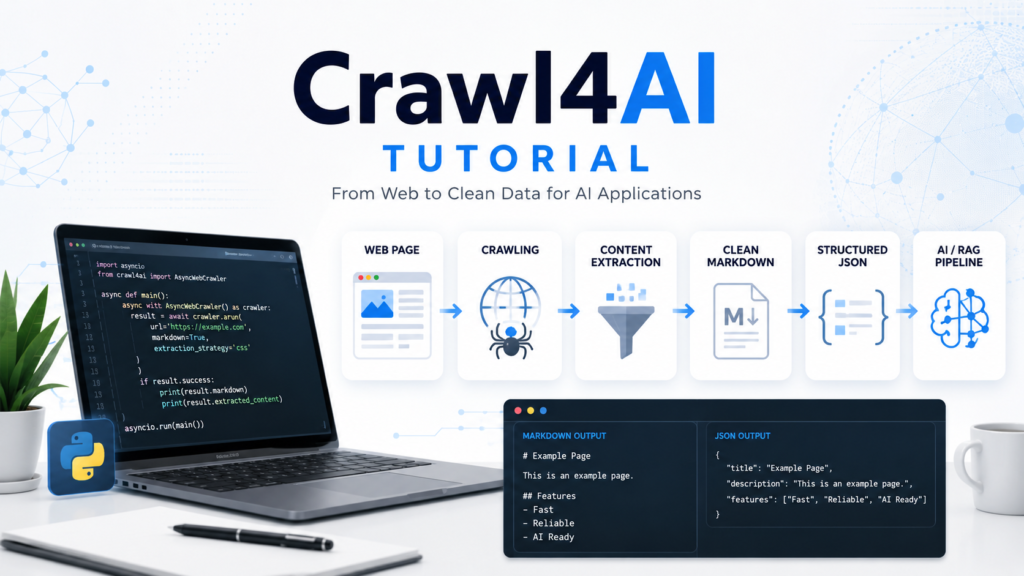
Crawl4AI gives developers a practical way to crawl webpages and convert web content into clean Markdown, structured data, links, media, and other useful outputs. Python-based workflows can use it for web scraping, research, AI agents, RAG pipelines, content processing, and structured data extraction without having to build every crawling component from scratch.
Crawl4AI combines asynchronous crawling, browser control, Markdown generation, content filtering, structured extraction, and dynamic-page handling into a single workflow. This tutorial covers the path from installation and a first crawl to configuration, clean Markdown, structured JSON, dynamic content, and advanced crawling concepts.
What Is Crawl4AI?
Crawl4AI is an open-source web crawling and scraping framework designed with modern AI and data workflows in mind. A crawler can visit a webpage, process its HTML, and return content in formats that are easier for applications to use.
Traditional scraping often requires separate tools for browser automation, HTML parsing, cleaning, and data transformation. Crawl4AI brings many of these tasks into a configurable crawling workflow.
Core capabilities include:
- Asynchronous web crawling
- Headless browser control
- HTML-to-Markdown conversion
- Structured data extraction
- CSS and XPath-based extraction
- Content filtering
- JavaScript execution
- Dynamic-page crawling
- Deep crawling
- Link and media extraction
- LLM-based extraction
Crawl4AI becomes especially useful when raw webpage HTML is not the final output you need. AI applications often work better with clean text, Markdown, or structured JSON than with an entire HTML document containing navigation, scripts, styles, and unrelated page elements.
Crawl4AI Requirements
Python should be available before beginning the setup. A virtual environment is also useful when you want to keep project dependencies isolated.
Check your Python installation from a terminal:
python --version
Creating a separate project directory can keep the crawler code and output organized.
mkdir crawl4ai-project
cd crawl4ai-project
Developers using production systems should prefer a stable Crawl4AI release rather than automatically depending on experimental pre-release builds.
Crawl4AI Installation
Crawl4AI can be installed through pip. Upgrade to the current stable package with:
pip install -U crawl4ai
Run the post-installation setup:
crawl4ai-setup
Installation can then be checked with:
crawl4ai-doctor
Browser-related problems may require a manual Chromium installation:
python -m playwright install --with-deps chromium
Crawl4AI uses browser automation for pages that require full browser rendering. Completing the browser setup is therefore important before testing more complex websites.
Crawl4AI First Web Crawl
AsyncWebCrawler provides a simple starting point for crawling a webpage.
Create a Python file and add:
import asyncio
from crawl4ai import AsyncWebCrawler

async def main():
    async with AsyncWebCrawler() as crawler:
        result = await crawler.arun("https://example.com")
        print(result.markdown[:300])

if __name__ == "__main__":
    asyncio.run(main())
Running this script creates an asynchronous crawler, opens the target URL, processes the page, and prints part of the generated Markdown.
AsyncWebCrawler() Manages the crawler lifecycle. crawler.arun() Performs the crawl, while result contains the information returned from that operation.
This basic pattern forms the foundation for more advanced Crawl4AI projects.
Understanding Crawl4AI Results
A crawl can return considerably more information than plain page text.
Useful result data can include:
- Markdown
- HTML
- Cleaned HTML
- Extracted structured content
- Internal and external links
- Images and other media
- Crawl status
- Error information
Checking whether a crawl succeeded before processing its output makes scripts more reliable.
import asyncio
from crawl4ai import AsyncWebCrawler

async def main():
    async with AsyncWebCrawler() as crawler:
        result = await crawler.arun("https://example.com")

        if result.success:
            print(result.markdown)
        else:
            print("Crawl failed:", result.error_message)

asyncio.run(main())
Error handling becomes increasingly important when a project crawls many URLs because one failed request should not necessarily interrupt the complete workflow.

BrowserConfig and CrawlerRunConfig
Crawl4AI separates browser-level settings from settings for individual crawl operations.
BrowserConfig Controls browser behavior. CrawlerRunConfig Controls how a particular crawl should operate.
Example:
import asyncio
from crawl4ai import (
    AsyncWebCrawler,
    BrowserConfig,
    CrawlerRunConfig,
    CacheMode
)

async def main():
    browser_config = BrowserConfig(
        headless=True
    )

    run_config = CrawlerRunConfig(
        cache_mode=CacheMode.BYPASS
    )

    async with AsyncWebCrawler(config=browser_config) as crawler:
        result = await crawler.arun(
            url="https://example.com",
            config=run_config
        )

        if result.success:
            print(result.markdown)

asyncio.run(main())
Headless mode allows the browser to operate without displaying its interface. Crawl configuration can control options such as caching, extraction strategies, page timeouts, JavaScript actions, content processing, and other crawl-specific behavior.
Separating these configurations makes larger projects easier to maintain.
Generating Clean Markdown
Markdown generation is one of Crawl4AI’s most useful capabilities for AI workflows.
Webpages normally contain considerably more than their primary content. Headers, menus, sidebars, buttons, advertisements, scripts, and footers can create noise. Markdown conversion provides a cleaner representation while retaining useful structures such as headings, paragraphs, lists, links, and code blocks.
A Markdown generator can be explicitly configured:
import asyncio
from crawl4ai import AsyncWebCrawler, CrawlerRunConfig
from crawl4ai.markdown_generation_strategy import DefaultMarkdownGenerator

async def main():
    run_config = CrawlerRunConfig(
        markdown_generator=DefaultMarkdownGenerator()
    )

    async with AsyncWebCrawler() as crawler:
        result = await crawler.arun(
            "https://example.com",
            config=run_config
        )

        if result.success:
            print(result.markdown)

asyncio.run(main())
Clean Markdown can then feed document-processing systems, search indexes, research tools, AI agents, or RAG pipelines.

Filtering Unwanted Page Content
Markdown can still contain sections that are irrelevant to a particular task. Crawl4AI provides content-filtering strategies for reducing that noise.
PruningContentFilter uses page characteristics such as text density, link density, tag importance, and structural context to remove less useful sections.
Example:
from crawl4ai.content_filter_strategy import PruningContentFilter
from crawl4ai.markdown_generation_strategy import DefaultMarkdownGenerator
from crawl4ai import CrawlerRunConfig

content_filter = PruningContentFilter(
    threshold=0.45,
    threshold_type="dynamic",
    min_word_threshold=5
)

markdown_generator = DefaultMarkdownGenerator(
    content_filter=content_filter
)

run_config = CrawlerRunConfig(
    markdown_generator=markdown_generator
)
Filtered output is available through:
result.markdown.fit_markdown
Raw Markdown preserves broader page content, while fit Markdown focuses on content retained by the selected filter.
BM25ContentFilter Provides another option when extraction should focus on information relevant to a specific query.
Structured Data Extraction
Markdown is ideal for many text-oriented workflows, but applications sometimes need predictable fields such as product names, article titles, URLs, prices, or descriptions.
JsonCssExtractionStrategy can extract structured data from pages with repeatable HTML structures.
Example schema:
schema = {
    "name": "Example Items",
    "baseSelector": "div.item",
    "fields": [
        {
            "name": "title",
            "selector": "h2",
            "type": "text"
        },
        {
            "name": "link",
            "selector": "a",
            "type": "attribute",
            "attribute": "href"
        }
    ]
}
Connect the schema to the crawler:
from crawl4ai import CrawlerRunConfig, JsonCssExtractionStrategy

run_config = CrawlerRunConfig(
    extraction_strategy=JsonCssExtractionStrategy(schema)
)
Extracted JSON is returned through:
result.extracted_content
Schema-based extraction is particularly useful for repeated page structures because it can provide consistent data without requiring an LLM for every page.

LLM-Based Extraction
Some pages do not have a simple or predictable structure. Information may be distributed across natural-language paragraphs or require interpretation.
Crawl4AI also supports LLM-based extraction for these situations.
An LLM extraction strategy can use instructions and a schema to transform crawled content into structured information. This flexibility can help when CSS or XPath selectors alone cannot describe the required extraction logic.
LLM extraction should not automatically replace deterministic extraction. Structured CSS or XPath extraction can be faster and avoids model usage costs when the source HTML already has a reliable structure.
A practical rule is simple: use deterministic extraction when page structure is predictable and consider LLM extraction when understanding the content itself is necessary.
Crawling JavaScript and Dynamic Pages
Modern websites frequently load information after the initial HTML response. Product lists, dashboards, social feeds, tabs, and “Load More” interfaces can depend on JavaScript.
Crawl4AI supports browser configuration and crawl options that allow workflows to execute JavaScript and wait for dynamic page changes.
CrawlerRunConfig can be configured with JavaScript actions and waiting conditions when content is not immediately available.
Dynamic crawling can follow a general workflow:
Open Page → Wait for Content → Execute Action → Detect Update → Extract Data
This capability separates browser-based crawling from basic HTTP-only scraping. Developers should still avoid unnecessary interactions; every extra browser action can increase crawling time and complexity.
Deep Crawling Multiple Pages
Single-page crawling works when all required information exists at one URL. Larger research or indexing tasks may need content from multiple connected pages.
Crawl4AI includes deep-crawling strategies that can discover and process pages beyond the starting URL. Breadth-first crawling, for example, can explore links level by level.
Deep crawling should always use sensible limits. Unrestricted crawling can create unnecessary requests, collect irrelevant URLs, and consume resources.
Useful controls include:
- Maximum crawl depth
- URL filtering
- Domain restrictions
- Page limits
- Content relevance rules
A focused crawl generally produces more useful data than collecting every reachable URL.
Crawl4AI for RAG and AI Workflows
RAG systems need useful source content before retrieval can produce useful context. Raw HTML is often inefficient because it includes markup and unrelated interface elements.
Crawl4AI can operate near the beginning of a RAG pipeline:
Website → Crawl4AI → Clean Markdown → Chunking → Embeddings → Vector Database → Retrieval → LLM
Crawl4AI handles the crawling and content-preparation side of this workflow. Other components remain responsible for embedding generation, vector storage, retrieval logic, and model responses.
Clean Markdown and fit Markdown can reduce unnecessary webpage noise before later processing stages.

Crawl4AI Best Practices
Reliable crawling depends on more than writing a working script.
Respect website access rules and applicable terms. Avoid generating unnecessary request volume. Set sensible crawl limits when processing multiple pages.
Prefer CSS or XPath extraction when the target structure is stable. Use content filters when clean textual output matters. Reserve LLM-based extraction for situations where semantic interpretation provides a real advantage.
Production workflows should also include error handling, logging, resource management, and validation of extracted data. A successful HTTP or browser operation does not guarantee that the returned content contains the information your application expects.
Common Crawl4AI Problems
Browser installation issues are among the first problems new users may encounter. Running the Crawl4AI setup and doctor commands can help verify the environment. Manual Chromium installation can resolve some Playwright-related setup problems.
Empty or incomplete results may have different causes. JavaScript content might not have loaded, the desired content may require an interaction, selectors may have changed, or a filter may be too restrictive.
Structured extraction failures should first be checked against the page’s current HTML. A CSS selector that worked previously can fail when a website changes its markup.
Debugging each stage separately—browser loading, page content, filtering, and extraction—usually makes the underlying issue easier to identify.
Crawl4AI FAQ
Is Crawl4AI suitable for beginners?
Basic crawling requires relatively little code, making the initial workflow approachable for developers familiar with Python. Advanced extraction and browser automation naturally require more technical knowledge.
Can Crawl4AI generate Markdown?
Yes. Crawl4AI can automatically convert crawled HTML into Markdown and can also apply content filters to create more focused Markdown.
Can Crawl4AI extract JSON?
Yes. Structured extraction strategies can convert repeatable webpage structures into JSON-compatible data.
Does Crawl4AI support JavaScript websites?
Yes. Browser-based crawling, JavaScript execution, waiting conditions, and session-related capabilities can be used for dynamic webpages.
Can Crawl4AI crawl multiple pages?
Yes. Deep-crawling strategies can explore pages beyond an initial URL while allowing developers to control crawl scope.
Does Crawl4AI require an LLM?
No. Many crawling, Markdown, CSS, XPath, and structured extraction tasks can run without an LLM. LLM extraction is an additional option for tasks requiring semantic interpretation.
Conclusion
Crawl4AI provides a flexible path from a webpage URL to clean Markdown, structured information, links, media, and content suitable for downstream AI workflows. Beginners can start with AsyncWebCrawler and a simple arun() call, while more advanced projects can add browser configuration, content filters, structured extraction, JavaScript interaction, and deep crawling.
Crawl4AI works best when each feature is selected for a clear purpose rather than enabling every advanced option at once. Clean Markdown can support RAG preparation, deterministic schemas can handle repeatable structures, browser automation can process dynamic pages, and deeper crawling can expand collection across relevant URLs. Building from a simple crawl toward these capabilities creates a cleaner and more maintainable crawling workflow.