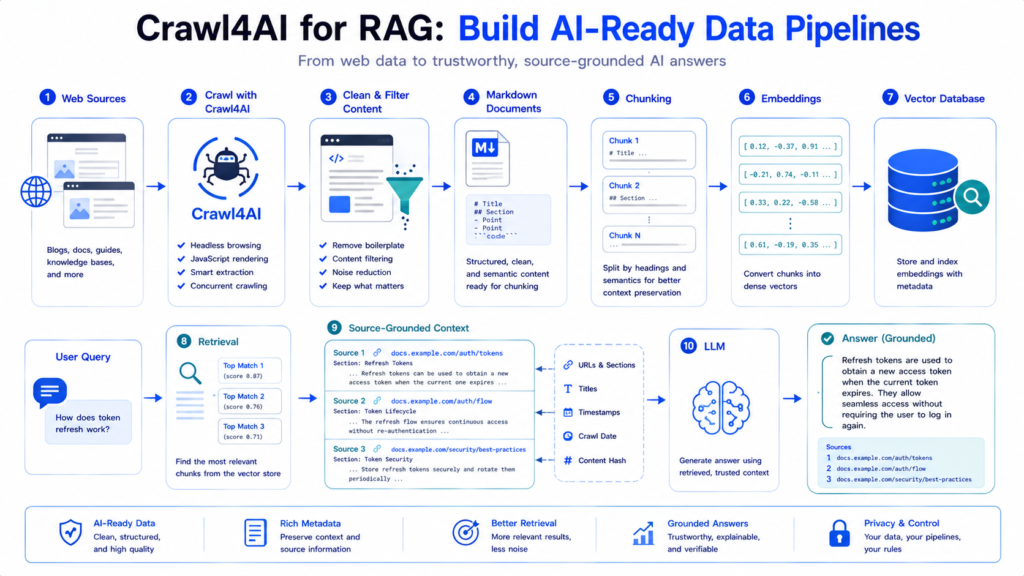
Crawl4AI for RAG connects web crawling with retrieval-augmented generation by turning live webpages into cleaner, structured content that can be chunked, embedded, indexed, retrieved, and supplied to an LLM. The important part is not simply downloading webpages. A useful RAG pipeline must control what gets crawled, what content survives cleaning, how documents are split, what metadata stays attached, and what finally reaches the model.
Crawl4AI is particularly useful at the ingestion side of this architecture because it can generate Markdown, Fit Markdown, structured extraction results, crawl multiple URLs concurrently, and perform query-focused adaptive crawling. The vector database and retrieval layer can then be implemented separately with the tools appropriate for your application.
What Does Crawl4AI Do in a RAG Pipeline?
A complete RAG system normally contains several independent stages:
Web Sources
    ↓
Crawl4AI
    ↓
Clean / Filter Content
    ↓
Document Preparation
    ↓
Chunking
    ↓
Embeddings
    ↓
Vector Database
    ↓
User Query
    ↓
Retrieval
    ↓
Relevant Context
    ↓
LLM
    ↓
Grounded Response
Crawl4AI primarily handles the web acquisition and content-preparation side of this pipeline.
It does not need to replace your:
Embedding model
Vector database
Retriever
Reranker
LLM
Application framework
Instead, its job is to provide those downstream components with better source material.
That distinction matters because poor source content cannot usually be fixed merely by choosing a stronger embedding model.
Why Raw HTML Is Poor RAG Input
Consider a normal documentation page.
The HTML may contain:
Navigation
Header
Sidebar
Cookie notice
Article
Related posts
Footer
Social links
Repeated menus
Tracking markup
Only part of that content may answer the user’s question.
Sending the complete HTML into a RAG ingestion pipeline can introduce several problems:
More noise
      ↓
More tokens
      ↓
Poorer chunks
      ↓
Less focused embeddings
      ↓
Noisier retrieval
Crawl4AI’s Markdown generation and content filters are designed specifically to reduce this problem. Its documentation describes Markdown generation as a way of extracting actual page content while reducing boilerplate and noise.
Build Your First Crawl-to-RAG Ingestion Step
Start with a simple page crawl:
import asyncio

from crawl4ai import (
    AsyncWebCrawler,
    CrawlerRunConfig
)


async def main():

    config = CrawlerRunConfig()

    async with AsyncWebCrawler() as crawler:

        result = await crawler.arun(
            url="https://example.com/docs",
            config=config
        )

        if result.success:

            markdown = (
                result.markdown.raw_markdown
            )

            print(markdown[:1000])


asyncio.run(main())
At this stage, you have already converted:
Webpage
   ↓
Browser crawl
   ↓
Processed page
   ↓
Markdown document
But this is only the beginning.
A production RAG pipeline should normally perform additional cleaning, metadata attachment, chunking, validation, indexing, and retrieval.
Raw Markdown vs Fit Markdown for RAG
Crawl4AI can expose both:
result.markdown.raw_markdownand, when a content filter is configured:
result.markdown.fit_markdownThe distinction is important.
Raw Markdown represents the broader converted page.
Fit Markdown is a filtered version intended to preserve more useful content while removing or ranking lower-value sections.
Crawl4AI’s current documentation also exposes fit_html, corresponding to the HTML that produced the filtered Markdown.
Conceptually:
Webpage
   ↓
Clean HTML
   ↓
Markdown Generator
   ├────────────→ Raw Markdown
   │
   ↓
Content Filter
   ↓
Fit Markdown
For RAG, Fit Markdown can often provide a cleaner starting point because less irrelevant material reaches the chunking stage.
Use PruningContentFilter for General Knowledge Bases
Sometimes you do not know the future user query.
Suppose you are building a general documentation knowledge base.
Use PruningContentFilter:
from crawl4ai import CrawlerRunConfig

from crawl4ai.content_filter_strategy import (
    PruningContentFilter
)

from crawl4ai.markdown_generation_strategy import (
    DefaultMarkdownGenerator
)


content_filter = PruningContentFilter(
    threshold=0.48,
    threshold_type="dynamic",
    min_word_threshold=10
)

markdown_generator = DefaultMarkdownGenerator(
    content_filter=content_filter
)

config = CrawlerRunConfig(
    markdown_generator=markdown_generator
)
After crawling:
fit_markdown = (
    result.markdown.fit_markdown
)
Pruning evaluates properties such as text density, link density, and HTML/tag characteristics to discard lower-value blocks.
This makes it useful for:
Documentation
Tutorials
Blog articles
Knowledge bases
General research corpora
where there is no single search query during ingestion.
Use BM25ContentFilter for Query-Focused Context
A different situation occurs when the information need is already known.
For example:
How does OAuth token refresh work?Configure BM25 filtering:
from crawl4ai.content_filter_strategy import (
    BM25ContentFilter
)

from crawl4ai.markdown_generation_strategy import (
    DefaultMarkdownGenerator
)

from crawl4ai import CrawlerRunConfig


filter_ = BM25ContentFilter(
    user_query=(
        "OAuth access token "
        "refresh authentication"
    ),
    bm25_threshold=1.2
)

generator = DefaultMarkdownGenerator(
    content_filter=filter_
)

config = CrawlerRunConfig(
    markdown_generator=generator
)
BM25 focuses content against the supplied query rather than merely performing generic cleanup. Crawl4AI documents BM25 as particularly useful when a specific user query is available.
The decision can therefore be simplified:
General corpus
     ↓
PruningContentFilter

Known information need
     ↓
BM25ContentFilter
Filter Before You Chunk
One of the most important RAG design decisions is the order of operations.
A weak pipeline can look like:
Huge noisy HTML
      ↓
Chunk everything
      ↓
Embed everything
A cleaner pipeline is:
Webpage
   ↓
Remove unwanted page elements
   ↓
Generate Markdown
   ↓
Filter low-value content
   ↓
Chunk useful content
   ↓
Embed
Why?
Suppose navigation appears on 500 pages.
If it survives ingestion, you may produce hundreds of chunks containing repeated navigation text.
Those chunks consume:
Storage
Embedding computation
Vector index space
Retrieval candidates
LLM context
without adding meaningful knowledge.
Crawl4AI supports exclusions such as excluded_tags, exclude_external_links, and word_count_threshold, followed by content filtering and Fit Markdown generation.
Preserve Document Structure Before Chunking
Markdown is valuable for RAG because document structure remains visible.
For example:
# Authentication

Authentication protects API requests.

## Access Tokens

Access tokens authorize requests.

### Refresh Tokens

Refresh tokens can obtain new access tokens.

```python
token = refresh_access_token()
Compare that with flattened text:

```text
Authentication Authentication protects API
requests Access Tokens Access tokens authorize
requests Refresh Tokens Refresh tokens...
The first representation gives a chunker useful structural signals.
Headings can be used as:
Section boundaries
Chunk titles
Metadata
Hierarchy
Retrieval context
Code fences, lists, paragraphs, and references can also retain meaning that might disappear during aggressive plain-text conversion.
Build Structure-Aware Chunks
Crawl4AI prepares the document, but your downstream pipeline should decide how chunks are constructed.
A simple chunk representation could be:
chunk = {
    "text": (
        "Refresh tokens can obtain "
        "new access tokens..."
    ),

    "metadata": {
        "url": (
            "https://example.com/"
            "docs/auth"
        ),
        "title": "Authentication",
        "section": "Refresh Tokens"
    }
}
A useful chunk should ideally answer:
What does this text say?
Where did it come from?
Which document contains it?
Which section contains it?
This is much stronger than storing an anonymous string.
Chunk by Meaning, Not Only Character Count
Fixed-size chunking is easy:
Characters 0–1500
Characters 1300–2800
Characters 2600–4100
but it may cut through:
Paragraphs
Code examples
Lists
Procedures
Heading boundaries
A better documentation pipeline can use Markdown structure:
H1
 ↓
H2 Section
 ↓
Paragraphs
 ↓
Code
 ↓
H2 Section
 ↓
Paragraphs
Then split oversized sections only when necessary.
A practical hierarchy is:
Preserve heading section
        ↓
Is section small enough?
   ↙                ↘
 Yes                 No
 ↓                    ↓
Keep             Split further
                     ↓
             Paragraph boundaries
                     ↓
                Token limit
This keeps semantically related information closer together.
Use Chunk Overlap Selectively
Overlap can preserve context across chunk boundaries.
Example:
Chunk 1
[--------------------]
[overlap]
Chunk 2 [——————–]
But excessive overlap creates duplicate information.
If every chunk repeats half of the previous chunk, the vector store contains many near-duplicates.
That can lead to retrieval such as:
Result 1 → same paragraph
Result 2 → same paragraph
Result 3 → almost same paragraph
instead of three complementary pieces of evidence.
Use enough overlap to protect continuity, but not so much that duplication dominates the index.
Attach Metadata Before Embedding
Each chunk should retain useful provenance.
For example:
metadata = {
    "source_url": result.url,
    "document_type": "documentation",
    "title": "API Authentication",
    "section": "Bearer Tokens",
    "language": "en"
}
Depending on the project, also consider:
Crawl timestamp
Canonical URL
Content category
Product/version
Author
Publication date
Depth
Parent page
Content hash
Metadata enables filtering before or during retrieval.
For example:
User asks about version 3
          ↓
Retrieve only:
version = 3
Instead of searching every historical version.
Generate Embeddings After Content Preparation
Once chunks are clean, convert them into embeddings.
Conceptually:
Chunk
  ↓
Embedding Model
  ↓
Vector
For example:
"Refresh tokens can obtain..."
        ↓
Embedding model
        ↓
[0.031, -0.144, 0.087, ...]
The embedding layer belongs downstream of Crawl4AI.
This separation is useful:
Crawl4AI
→ controls source quality

Chunker
→ controls context units

Embedding model
→ controls vector representation

Vector database
→ controls storage/search

Retriever
→ controls evidence selection

LLM
→ generates final response
Treating these as separate layers makes the system easier to improve.
Store Chunks in a Vector Database
A typical stored record might conceptually contain:
{
  "id": "doc-42-chunk-7",
  "text": "Refresh tokens can obtain...",
  "vector": [0.031, -0.144, 0.087],
  "metadata": {
    "url": "https://example.com/docs/auth",
    "section": "Refresh Tokens"
  }
}
The exact schema depends on your database.
But the core relationship remains:
Chunk text
+
Embedding
+
Metadata
+
Stable ID
Do not store vectors without enough source information to trace a retrieved passage back to its origin.
Understand Retrieval at Query Time
Ingestion happens before the user asks a question.
Retrieval happens afterward.
The query-time flow is:
User Question
      ↓
Query Embedding
      ↓
Vector Search
      ↓
Top Candidate Chunks
      ↓
Optional Filtering / Reranking
      ↓
Selected Evidence
      ↓
LLM Prompt
      ↓
Answer
For example:
Question:
"How are refresh tokens handled?"

        ↓

Retrieved:
Authentication → Refresh Tokens
Authentication → Token Rotation
Security → Token Expiration
Only this selected evidence needs to enter the LLM context.
Separate Ingestion from Retrieval
A production architecture should distinguish two pipelines.
Ingestion
Website
   ↓
Crawl
   ↓
Clean
   ↓
Chunk
   ↓
Embed
   ↓
Index
Query
Question
   ↓
Embed Query
   ↓
Search Index
   ↓
Retrieve
   ↓
Rerank
   ↓
LLM
Keeping them separate makes debugging significantly easier.
If the answer is poor, you can ask:
Was the page crawled?
Was the right content retained?
Was chunking sensible?
Was the chunk indexed?
Was it retrieved?
Was it ranked highly?
Did the LLM receive it?
That is much more useful than treating RAG as one opaque process.
Crawl Multiple Documents with arun_many()
A useful RAG corpus usually contains more than one URL.
When the URLs are already known, Crawl4AI provides arun_many() for concurrent or batch crawling. Its current API can return either a result collection or an async generator when streaming is enabled.
Example:
import asyncio

from crawl4ai import (
    AsyncWebCrawler,
    CrawlerRunConfig
)


async def main():

    urls = [
        "https://example.com/docs/auth",
        "https://example.com/docs/api",
        "https://example.com/docs/security"
    ]

    config = CrawlerRunConfig(
        stream=True
    )

    async with AsyncWebCrawler() as crawler:

        async for result in await crawler.arun_many(
            urls,
            config=config
        ):

            if not result.success:
                continue

            markdown = (
                result.markdown.raw_markdown
            )

            # Next:
            # clean
            # chunk
            # embed
            # index

            print(result.url)


asyncio.run(main())
Crawl4AI’s default multi-URL behavior can use a memory-adaptive dispatcher to control concurrency based on system resources.
Stream Large RAG Ingestion Jobs
For a small crawl, you might wait until all pages finish.
For a large ingestion job, streaming is often more useful:
Page 1 finished
      ↓
Clean
      ↓
Chunk
      ↓
Embed
      ↓
Store

Page 2 finished
      ↓
Clean
      ↓
Chunk
      ↓
Embed
      ↓
Store
instead of:
Crawl every page
      ↓
Wait
      ↓
Process everything
With stream=True, arun_many() can yield results progressively.
That lets downstream processing begin before the complete crawl finishes.
Add Backpressure to the Pipeline
Streaming introduces another production concern.
Suppose crawling produces pages faster than embeddings can be generated:
Crawler
████████████████ → fast

Embedder
██████           → slower
Without control, an ever-growing queue can consume memory.
A better architecture is:
Crawler Workers
      ↓
Bounded Queue
      ↓
Chunk Workers
      ↓
Embedding Workers
      ↓
Vector Store
The bounded queue creates backpressure.
When downstream processing reaches capacity, upstream work can slow rather than accumulating unlimited pending data.
This is an application-level pipeline concern rather than a Crawl4AI-specific feature, but it becomes important when Crawl4AI feeds large RAG ingestion systems.
Use Adaptive Crawling for Question-Focused RAG
Sometimes you do not want to index an entire website.
Instead, you already have a research question:
How does this framework manage authentication?Crawl4AI’s AdaptiveCrawler can collect pages until its coverage, consistency, and saturation signals indicate sufficient information has been gathered.
Example:
from crawl4ai import (
    AsyncWebCrawler,
    AdaptiveCrawler
)


async with AsyncWebCrawler() as crawler:

    adaptive = AdaptiveCrawler(crawler)

    await adaptive.digest(
        start_url="https://example.com/docs",
        query=(
            "authentication access tokens "
            "refresh tokens security"
        )
    )

    pages = adaptive.get_relevant_content(
        top_k=5
    )
Those top relevant pages can then feed:
Cleaning
   ↓
Chunking
   ↓
Embeddings
   ↓
Temporary or persistent index
Adaptive crawling is explicitly documented for question answering and focused knowledge-base construction.
Static Corpus vs Adaptive RAG
These approaches solve different problems.
| Static RAG Corpus | Adaptive Research |
|---|---|
| Crawl ahead of time | Crawl around a question |
| Persistent index | Can create focused evidence |
| Good for repeated queries | Good for targeted research |
| Broader coverage | Selective coverage |
| Higher ingestion cost | Potentially fewer pages |
| Fast query-time retrieval | Crawl latency may be involved |
A documentation chatbot serving thousands of repeated questions usually benefits from a persistent corpus.
A research agent investigating a new topic may benefit from adaptive crawling.
A sophisticated system can use both.
Combine Persistent Retrieval with Live Crawling
Consider a user question that is not adequately answered by the current vector database.
A hybrid system can use:
User Question
      ↓
Search Existing Index
      ↓
Enough Evidence?
   ↙             ↘
 Yes             No
 ↓                ↓
Answer        Crawl Fresh Sources
                  ↓
               Clean
                  ↓
               Chunk
                  ↓
              Retrieve
                  ↓
               Answer
The newly crawled material can either:
Remain temporaryor:
Pass validation
      ↓
Enter persistent knowledge base
This creates a path between static RAG and agentic web research.
Avoid Embedding Every Crawled Page Blindly
Successful crawling does not automatically mean a page belongs in the knowledge base.
Before indexing, validate:
Crawl succeeded?
Content exists?
Relevant document type?
Enough useful text?
Correct language?
Duplicate?
Canonical source?
Allowed source?
Current version?
A page might technically crawl successfully but contain:
404 template
Login page
Cookie wall
Navigation-only content
Duplicate print view
Old documentation
Error response
Such pages should not automatically become RAG knowledge.
Deduplicate Before Vector Storage
Duplicate content is a major retrieval-quality problem.
For example:
/docs/auth
/docs/auth/
/docs/auth?ref=nav
/print/auth
could expose substantially the same content.
A simple ingestion process can compute a normalized content hash:
import hashlib


def content_hash(text):

    normalized = " ".join(
        text.lower().split()
    )

    return hashlib.sha256(
        normalized.encode("utf-8")
    ).hexdigest()
Then:
New document
    ↓
Compute hash
    ↓
Hash already indexed?
  ↙             ↘
Yes             No
 ↓               ↓
Skip           Continue
For near-duplicates, more advanced similarity methods may be required.
Use Stable IDs for Updates
A RAG corpus changes over time.
Suppose:
/docs/authis crawled today and again next week.
If every crawl creates completely new anonymous chunks, the database may accumulate stale versions.
Instead, derive stable document identity from information such as:
Canonical URL
+
Document section
+
Version
Then updates can:
Replace changed chunks
Delete obsolete chunks
Preserve unchanged chunks
This is much cleaner than endlessly appending new vectors.
Track Content Hashes for Incremental Ingestion
A useful update process is:
Crawl URL
   ↓
Clean Content
   ↓
Calculate Hash
   ↓
Compare with Stored Hash
   ↓
Changed?
 ↙      ↘
No       Yes
↓         ↓
Skip    Re-chunk
        ↓
      Re-embed
        ↓
      Update
This avoids paying the embedding cost for unchanged documents.
At scale, incremental ingestion can save significant compute and storage.
Keep Source URLs with Retrieved Context
A RAG answer is more trustworthy when its evidence can be traced.
Each retrieved chunk should retain at least:
Source URL
Document title
Section
Then your application can create evidence objects such as:
{
    "text": retrieved_text,
    "source": source_url,
    "title": document_title,
    "section": section_title,
    "score": retrieval_score
}
This also helps debug incorrect answers.
If a model produces a questionable statement, you can inspect exactly which source chunks were supplied.
Do Not Send Every Retrieved Chunk to the LLM
Suppose vector search returns 20 candidates.
That does not mean all 20 belong in the prompt.
A stronger retrieval flow is:
Vector Search
    ↓
Top 20 Candidates
    ↓
Metadata Filters
    ↓
Deduplicate
    ↓
Rerank
    ↓
Top 5 Strong Chunks
    ↓
LLM
The exact numbers depend on your data and model.
The principle is more important:
retrieval should maximize useful evidence, not context volume.
Fit Markdown Can Reduce LLM Input
Crawl4AI’s LLM extraction functionality supports input formats including:
html
markdown
fit_markdown
The documentation specifically notes that fit_markdown can substantially reduce token input when a content filter is trusted.
That same principle applies to RAG ingestion.
Compare:
Raw webpage
≈ navigation + content + boilerplate
with:
Fit Markdown
≈ focused document content
Cleaner input can mean:
Fewer useless chunks
Lower embedding volume
Less storage
Cleaner retrieval
Less LLM context noise
But aggressive filtering can also remove useful information, so filtering thresholds should be evaluated against real queries.
Measure RAG Quality at Multiple Layers
Do not evaluate only the final answer.
A useful evaluation stack is:
1. Crawl Quality
Did we collect the right pages?

2. Cleaning Quality
Did useful content survive?

3. Chunk Quality
Are chunks coherent?

4. Retrieval Recall
Was the required evidence retrieved?

5. Retrieval Precision
How much retrieved content was actually useful?

6. Answer Grounding
Does the answer follow the supplied evidence?
This allows problems to be localized.
For example:
Correct page never crawled
→ crawling problem

Correct page crawled but section removed
→ filtering problem

Correct chunk indexed but not retrieved
→ retrieval problem

Correct evidence supplied but answer wrong
→ generation problem
Without this separation, teams often tune the LLM for problems originating much earlier in the pipeline.
Build a Practical Crawl4AI RAG Ingestion Function
The following pattern keeps Crawl4AI focused on acquisition and preparation:
import asyncio

from crawl4ai import (
    AsyncWebCrawler,
    CrawlerRunConfig
)

from crawl4ai.content_filter_strategy import (
    PruningContentFilter
)

from crawl4ai.markdown_generation_strategy import (
    DefaultMarkdownGenerator
)


async def crawl_for_rag(url):

    filter_ = PruningContentFilter(
        threshold=0.48,
        threshold_type="dynamic",
        min_word_threshold=10
    )

    generator = DefaultMarkdownGenerator(
        content_filter=filter_
    )

    config = CrawlerRunConfig(
        excluded_tags=[
            "nav",
            "footer",
            "header"
        ],
        markdown_generator=generator
    )

    async with AsyncWebCrawler() as crawler:

        result = await crawler.arun(
            url=url,
            config=config
        )

        if not result.success:
            return None

        return {
            "url": result.url,
            "markdown": (
                result.markdown.fit_markdown
                or
                result.markdown.raw_markdown
            )
        }


async def main():

    document = await crawl_for_rag(
        "https://example.com/docs"
    )

    if document:
        print(document["url"])
        print(document["markdown"][:1000])


asyncio.run(main())
This produces a document ready for your own:
Metadata enrichment
Chunking
Embedding
Indexing
Crawl4AI supports this layered filtering pattern through crawler exclusions, Markdown generation, and content filters.
Production RAG Pipeline Architecture
A more complete production design can look like:
              WEB SOURCES
                   ↓
              URL DISCOVERY
                   ↓
                Crawl4AI
                   ↓
          Successful Crawl?
             ↙          ↘
           No            Yes
           ↓              ↓
       Retry / Log     Clean Content
                          ↓
                    Fit Markdown
                          ↓
                       Validate
                          ↓
                      Deduplicate
                          ↓
                  Metadata Enrichment
                          ↓
                        Chunk
                          ↓
                  Embedding Workers
                          ↓
                     Vector Store
                          ↓
              ─────────────────────
                          ↓
                     USER QUERY
                          ↓
                    Query Embedding
                          ↓
                      Retrieval
                          ↓
                 Metadata Filtering
                          ↓
                      Reranking
                          ↓
                 Context Selection
                          ↓
                         LLM
                          ↓
                       Answer
This architecture keeps ingestion and query-time processing clearly separated while preserving a traceable path from answer back to source.
Common Crawl4AI RAG Mistakes
Indexing Raw HTML Directly
Raw HTML contains structural and navigational noise. Prefer cleaned content or Markdown when HTML semantics are not specifically required.
Chunking Before Cleaning
This creates chunks from content that should never have entered the knowledge base.
Removing Too Much Content
Over-aggressive Fit Markdown filtering can discard useful evidence. Compare raw and fit outputs during evaluation.
Ignoring Metadata
Without URL, title, section, version, and similar fields, retrieval becomes harder to filter and citations become harder to generate.
Embedding Duplicate Pages
Duplicate vectors waste storage and can dominate search results.
Re-Embedding Unchanged Content
Use content hashes or another change-detection mechanism before rebuilding embeddings.
Mixing Old and New Documentation
Store version metadata and filter retrieval when different versions contain conflicting instructions.
Assuming More Context Is Better
Large context containing irrelevant chunks can make answers worse rather than better.
Treating RAG as Only a Vector Database
A vector store is one component.
The complete system is:
Acquisition
+
Cleaning
+
Chunking
+
Embedding
+
Indexing
+
Retrieval
+
Reranking
+
Generation
+
Evaluation
Crawl4AI for RAG FAQ
Is Crawl4AI itself a vector database?
No. Crawl4AI handles crawling and content preparation; vector storage and retrieval can be provided by a separate system.
Can Crawl4AI generate content suitable for RAG?
Yes. Its Markdown and Fit Markdown outputs are particularly useful for preparing web content for downstream AI pipelines.
Should I use raw_markdown or fit_markdown?
Use raw_markdown when broad page coverage is important. Consider fit_markdown when you want filtered, denser content and have validated that the filter does not remove required evidence.
Which content filter is better for RAG?
PruningContentFilter is useful for general cleanup without a specific query. BM25ContentFilter is better suited to query-focused filtering.
Can Crawl4AI ingest many URLs?
Yes. arun_many() supports multi-URL crawling and can stream completed results.
Can Crawl4AI crawl only enough pages to answer a question?
Adaptive crawling is designed for this type of information-sufficiency problem and can stop based on coverage, consistency, and saturation.
Does Crawl4AI create embeddings?
The RAG architecture described here treats embeddings as a downstream step. Crawl4AI’s key role is acquiring and preparing useful web content before that stage.
Should every crawled page be added to the vector database?
No. Validate relevance, content quality, duplication, source eligibility, and version before indexing.
How should I update a Crawl4AI RAG knowledge base?
Recrawl sources according to your freshness requirements, compare normalized content or hashes with the indexed version, and re-chunk/re-embed only documents that changed.
Can Crawl4AI support live RAG?
Yes, it can be used as the web-acquisition layer in a live or hybrid retrieval architecture. Whether crawling should happen at query time depends on latency, freshness requirements, source availability, and application design.
Conclusion
Crawl4AI for RAG works best when Crawl4AI is treated as the web intelligence and content-preparation layer, not as the entire RAG stack. It can crawl pages, generate structured Markdown, produce Fit Markdown, filter noisy content, process multiple URLs, and perform adaptive query-focused research. Those outputs can then move through validation, deduplication, metadata enrichment, structure-aware chunking, embeddings, vector storage, retrieval, reranking, and finally the LLM.
The quality of the final AI answer depends on every stage before generation. Clean source acquisition, sensible filtering, traceable metadata, coherent chunks, controlled updates, and selective retrieval usually matter more than simply collecting more webpages. A strong Crawl4AI RAG pipeline therefore aims for better evidence per chunk, not merely a larger vector database.