
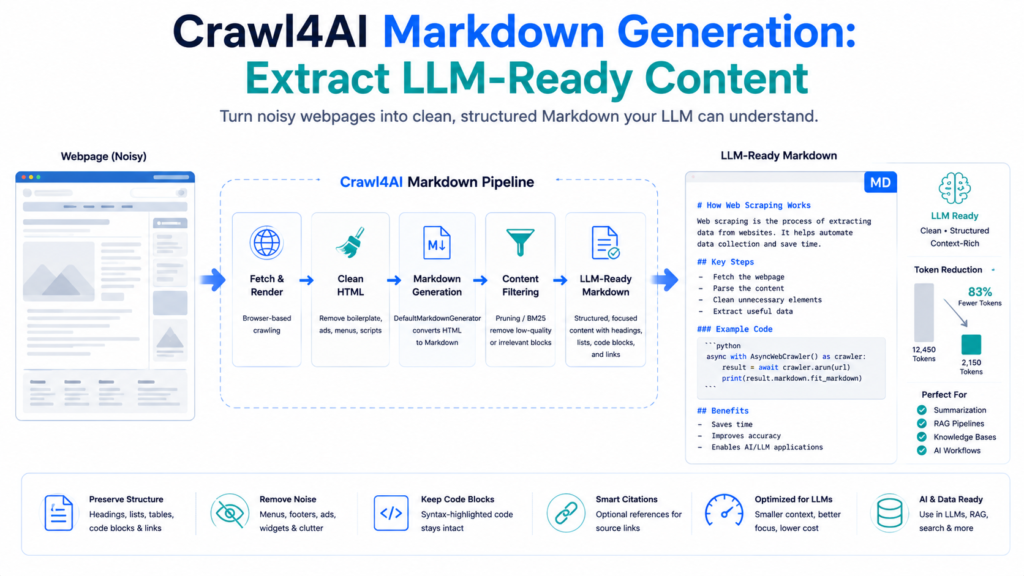
Crawl4AI Markdown generation converts complex webpage HTML into structured, readable content that is easier to use in LLMs, knowledge bases, summarization systems, search pipelines, and AI applications. Instead of feeding an AI model navigation menus, scripts, styling markup, advertisements, and other webpage clutter, developers can generate Markdown that preserves useful structures such as headings, paragraphs, lists, links, and code blocks.
Crawl4AI also provides more than one form of Markdown. Developers can access raw Markdown, citation-aware Markdown, references, and filtered Fit Markdown depending on the configured workflow. Content filters can further reduce irrelevant material before content reaches an LLM, helping create smaller and more focused inputs.
Why Markdown Works Well for LLM Content
HTML contains structural information designed primarily for browsers.
A webpage might contain:
<div class="article">
    <h1>Web Scraping Guide</h1>
    <p>Web scraping extracts useful information...</p>
</div>
Markdown represents the same information more simply:
# Web Scraping Guide

Web scraping extracts useful information...
Markdown retains meaningful document structure without requiring an LLM to process large amounts of presentation-oriented markup.
Useful elements can remain recognizable:
# Main Heading

## Section Heading

Regular paragraph text.

- First item
- Second item

```python
print("Code example")
Crawl4AI's default Markdown generation is designed to preserve structures including headings, code blocks, and lists while eliminating HTML elements such as scripts and styles that do not contribute meaningful textual content. :contentReference[oaicite:1]{index=1}

## Generate Markdown with Crawl4AI

`DefaultMarkdownGenerator` controls HTML-to-Markdown generation.

A straightforward example is:

```python
import asyncio

from crawl4ai import AsyncWebCrawler, CrawlerRunConfig
from crawl4ai.markdown_generation_strategy import DefaultMarkdownGenerator

async def main():

    config = CrawlerRunConfig(
        markdown_generator=DefaultMarkdownGenerator()
    )

    async with AsyncWebCrawler() as crawler:
        result = await crawler.arun(
            url="https://example.com",
            config=config
        )

        if result.success:
            print(result.markdown.raw_markdown)
        else:
            print(result.error_message)

asyncio.run(main())
CrawlerRunConfig receives the Markdown generator and applies it to the crawl.
The resulting MarkdownGenerationResult contains different Markdown representations depending on the configuration.

Understand MarkdownGenerationResult
Treating result.markdown as one simple text string can hide useful functionality.
Current Crawl4AI results can provide:
| Output | Purpose |
|---|---|
raw_markdown | Standard HTML-to-Markdown output |
markdown_with_citations | Markdown containing citation references |
references_markdown | Reference definitions associated with citations |
fit_markdown | Filtered, focused Markdown |
fit_html | Filtered HTML used to produce Fit Markdown |

These outputs allow one crawl to support different downstream requirements.
A project preparing a broad archive may retainraw_markdown, while an LLM pipeline concerned with focused information may prefer fit_markdown.
Raw Markdown
Raw Markdown is the normal HTML-to-Markdown conversion.
Access it with:
markdown = result.markdown.raw_markdownRaw Markdown is useful when most page content should be retained.
For example, documentation pages may contain:
# API Documentation

## Authentication

Authentication requires an API key.

## Parameters

- `url`: Target URL
- `timeout`: Request timeout

## Example

```python
client.run()
The result is considerably easier for text-oriented systems to process than the original nested HTML.

Raw Markdown should not, however, be interpreted as automatically containing only the most relevant information. Boilerplate can still remain depending on the source page and crawl configuration.

## Configure Markdown Output

`DefaultMarkdownGenerator` accepts an `options` dictionary for controlling conversion behavior.

Example:

```python
from crawl4ai.markdown_generation_strategy import DefaultMarkdownGenerator

md_generator = DefaultMarkdownGenerator(
    options={
        "ignore_links": True,
        "ignore_images": True,
        "body_width": 0
    }
)
Then:
config = CrawlerRunConfig(
    markdown_generator=md_generator
)
Useful options documented by Crawl4AI include ignore_links, ignore_images, escape_html, body_width, skip_internal_links, and include_sup_sub.
Ignore Links
options={
    "ignore_links": True
}
This is useful when hyperlink destinations add no value to the downstream model.
Ignore Images
options={
    "ignore_images": True
}
Image references can be removed when a pipeline only needs textual content.
Control Line Wrapping
options={
    "body_width": 0
}
A width of 0 or None can prevent artificial line wrapping, which is often convenient when Markdown will be processed programmatically.
Choose the HTML Source
Markdown quality also depends on which HTML representation enters the converter.
DefaultMarkdownGenerator supports content_source.
Three documented options are:
raw_html
cleaned_html
fit_html
cleaned_html
DefaultMarkdownGenerator(
    content_source="cleaned_html"
)
cleaned_html is the default and generally provides a useful balance between preserving page content and reducing unnecessary HTML.
raw_html
DefaultMarkdownGenerator(
    content_source="raw_html"
)
Raw HTML is useful when earlier cleaning removes information that the application actually needs.
fit_html
DefaultMarkdownGenerator(
    content_source="fit_html"
)
Fit HTML is preprocessed HTML optimized for structured-data-oriented processing.
Crawl4AI recommends cleaned HTML for most ordinary Markdown-generation scenarios.
Generate Markdown with Link Citations
Research and knowledge workflows sometimes need the original destinations of referenced links.
Crawl4AI can generate citation-oriented Markdown.
Example configuration:
md_generator = DefaultMarkdownGenerator(
    options={
        "citations": True
    }
)

config = CrawlerRunConfig(
    markdown_generator=md_generator
)
Results can then expose:
print(result.markdown.markdown_with_citations)
print(result.markdown.references_markdown)
A link can be represented through a reference in the text while its destination appears in the reference section.

This separates readable content from long URLs while retaining source destinations for workflows where references matter.
Raw Markdown vs Fit Markdown
Raw Markdown and Fit Markdown serve different purposes.
Raw Markdown attempts to retain the broader converted page.
Fit Markdown contains content remaining after a configured content filter has removed or reduced less useful sections.
A simple comparison can be made with:
print(
    "Raw:",
    len(result.markdown.raw_markdown)
)

print(
    "Fit:",
    len(result.markdown.fit_markdown)
)
Fit Markdown is only meaningful when a compatible content filter is used.
Crawl4AI documents PruningContentFilter and BM25ContentFilter as two major non-LLM approaches for generating focused Markdown.
Create Fit Markdown with PruningContentFilter
PruningContentFilter works without requiring a specific search query.
It analyzes signals including text density, link density, HTML tag importance, and structural context to identify weaker content blocks.
Example:
import asyncio

from crawl4ai import AsyncWebCrawler, CrawlerRunConfig
from crawl4ai.content_filter_strategy import PruningContentFilter
from crawl4ai.markdown_generation_strategy import DefaultMarkdownGenerator

async def main():

    content_filter = PruningContentFilter(
        threshold=0.5,
        threshold_type="dynamic",
        min_word_threshold=10
    )

    md_generator = DefaultMarkdownGenerator(
        content_filter=content_filter
    )

    config = CrawlerRunConfig(
        markdown_generator=md_generator
    )

    async with AsyncWebCrawler() as crawler:
        result = await crawler.arun(
            "https://example.com",
            config=config
        )

        if result.success:
            print(result.markdown.fit_markdown)

asyncio.run(main())
Important parameters include:
threshold — determines the filtering cutoff.
threshold_type — supports fixed or dynamic behavior.
min_word_threshold — helps eliminate very short blocks.
Higher filtering strength does not automatically mean better LLM input. Excessive pruning can remove context needed to understand the remaining content.
Generate Query-Focused Markdown with BM25
BM25ContentFilter is more appropriate when the desired topic is already known.
Suppose a long webpage discusses Python, databases, machine learning, cloud services, and networking, but the AI application only needs machine-learning information.
Configuration can focus on that subject:
from crawl4ai.content_filter_strategy import BM25ContentFilter
from crawl4ai.markdown_generation_strategy import DefaultMarkdownGenerator

content_filter = BM25ContentFilter(
    user_query="machine learning",
    bm25_threshold=1.2,
    language="english"
)

md_generator = DefaultMarkdownGenerator(
    content_filter=content_filter,
    options={
        "ignore_links": True
    }
)

config = CrawlerRunConfig(
    markdown_generator=md_generator
)
BM25 scores blocks according to their relevance to the supplied query. Raising the threshold generally retains fewer blocks; lowering it retains more.
This approach can create focused Markdown without making an LLM call just to decide which webpage sections are relevant.
Pruning vs BM25
Choosing the correct filter depends on the task.
| Requirement | Better Starting Point |
|---|---|
| General webpage cleanup | Pruning |
| No search query available | Pruning |
| Topic-specific extraction | BM25 |
| Search-oriented pipeline | BM25 |
| Reduce generic boilerplate | Pruning |
| Keep blocks related to a known question | BM25 |

Pruning evaluates content quality and page structure. BM25 evaluates textual relevance to a query.
Neither should be treated as universally superior.
LLM-Based Content Filtering
Crawl4AI also provides LLMContentFilter for cases where semantic interpretation is needed.
The filter accepts an LLM configuration and instructions describing what content should remain.
Conceptually:
from crawl4ai import LLMConfig
from crawl4ai.content_filter_strategy import LLMContentFilter

content_filter = LLMContentFilter(
    llm_config=LLMConfig(
        provider="YOUR_PROVIDER",
        api_token="YOUR_API_TOKEN"
    ),
    instruction="""
    Keep the core educational content.
    Preserve technical explanations and code examples.
    Remove navigation and unrelated material.
    """
)
It can then be passed into DefaultMarkdownGenerator.
Crawl4AI documents chunk-based processing for large inputs and allows instructions to control what the LLM filter retains.
LLM filtering should not be the automatic first choice. Pruning and BM25 avoid model-call costs and can be sufficient for many predictable workflows.
Build an LLM-Ready Markdown Pipeline
A practical pipeline can combine page-level cleanup with Markdown-level filtering.
import asyncio

from crawl4ai import AsyncWebCrawler, CrawlerRunConfig
from crawl4ai.content_filter_strategy import PruningContentFilter
from crawl4ai.markdown_generation_strategy import DefaultMarkdownGenerator

async def main():

    filter_strategy = PruningContentFilter(
        threshold=0.5,
        threshold_type="dynamic",
        min_word_threshold=10
    )

    markdown_generator = DefaultMarkdownGenerator(
        content_filter=filter_strategy,
        content_source="cleaned_html",
        options={
            "ignore_images": True,
            "skip_internal_links": True,
            "body_width": 0
        }
    )

    config = CrawlerRunConfig(
        excluded_tags=[
            "nav",
            "footer",
            "form",
            "aside"
        ],
        markdown_generator=markdown_generator
    )

    async with AsyncWebCrawler() as crawler:

        result = await crawler.arun(
            "https://example.com",
            config=config
        )

        if not result.success:
            print(result.error_message)
            return

        llm_ready_content = (
            result.markdown.fit_markdown
        )

        print(llm_ready_content)

asyncio.run(main())
This workflow follows a useful sequence:
Webpage → Clean HTML → Markdown Conversion → Content Filter → Fit Markdown → AI Pipeline
Every project should tune exclusions and filter thresholds against its own source pages.
Why Fit Markdown Can Reduce LLM Tokens
Large HTML documents can contain substantial text unrelated to the user’s actual task.
Removing unnecessary material before an LLM call means the model receives a smaller input.
Crawl4AI’s LLM extraction documentation explicitly supports input_format="fit_markdown" and notes that filtered Markdown can substantially reduce tokens when the filter is trusted.
Consider a page containing:
Navigation
Account controls
Category links
Article
Related posts
Newsletter
Footer
Legal information
A focused result might contain:
Article title
Introduction
Relevant sections
Code examples
Conclusion
Token reduction should not become the only objective. Removing essential context can hurt answer quality even when input size decreases.

Prepare Markdown for Chunking
Long documents may still exceed the preferred input size of an AI workflow after filtering.
Markdown’s heading structure provides useful boundaries:
# Main Topic

## Installation

...

## Configuration

...

## Examples

...
A downstream chunker can divide content by headings, paragraph groups, token limits, or application-specific boundaries.
Crawl4AI’s LLM extraction strategy also supports configurable chunking parameters, including token thresholds and chunk overlap.
Overlap can preserve context across boundaries, but excessive overlap duplicates content and increases token usage.
Preserve Code Blocks and Technical Structure
Technical documentation should not be reduced to plain unstructured text.
Code:
```python
async with AsyncWebCrawler() as crawler:
    result = await crawler.arun(url)
```
Lists:
- First requirement
- Second requirement
- Third requirement
Headings:
## ConfigurationThese structures provide useful semantic boundaries to downstream systems.
Crawl4AI’s Markdown converter specifically preserves important structures such as headings, code blocks, and bullet points.
Validate Markdown Before Sending It to an LLM
Successful Markdown generation does not guarantee high-quality AI input.
Check the result before storage or model processing.
Example:
markdown = result.markdown.fit_markdown

if not markdown:
    print("No filtered Markdown generated")

elif len(markdown.strip()) < 200:
    print("Markdown may be too short")

else:
    print("Markdown ready for processing")
Useful validation questions include:
- Does the title remain?
- Are important headings preserved?
- Are code examples complete?
- Did navigation disappear?
- Did filtering remove important context?
- Does the content contain duplicate sections?
- Are references required?
- Is the output large enough to be useful?
Comparing raw and Fit Markdown during development is one of the easiest ways to detect overly aggressive filtering.
Save LLM-Ready Markdown
Markdown can be saved directly:
from pathlib import Path

Path("llm-ready-content.md").write_text(
    result.markdown.fit_markdown,
    encoding="utf-8"
)
Metadata can be stored separately when the downstream pipeline needs source tracking:
data = {
    "source_url": result.url,
    "content": result.markdown.fit_markdown
}
Source URLs, crawl timestamps, document identifiers, and titles can be valuable when building searchable knowledge systems.
Common Markdown Generation Problems
Markdown Contains Too Much Noise
Add page-level exclusions or a PruningContentFilter.
Important Content Is Missing
Compare:
result.markdown.raw_markdownagainst:
result.markdown.fit_markdownThen reduce filtering strength or reconsider the selected HTML source.
Links Make the Output Too Large
Use:
options={
    "ignore_links": True
}
Image References Are Unnecessary
Use:
options={
    "ignore_images": True
}
Topic-Specific Content Is Buried
Use BM25 with a focused user_query.
AI Input Is Still Too Large
Filter first, then chunk the resulting Markdown while retaining enough overlap or structural context for the downstream task.
Crawl4AI Markdown FAQ
Does Crawl4AI automatically generate Markdown?
Yes. Crawl4AI generates Markdown from crawled pages, while DefaultMarkdownGenerator gives developers explicit control over generation and filtering behavior.
What is raw Markdown?
raw_markdown is the standard HTML-to-Markdown conversion before content-filter output is applied.
What is Fit Markdown?
fit_markdown is the focused Markdown produced when a compatible content filter removes or ranks page sections.
Is Fit Markdown better for LLMs?
Fit Markdown can be useful when irrelevant content can safely be removed before the model receives the document. The best choice depends on whether the filter preserves the context required by the task.
Can Crawl4AI preserve citations?
Yes. MarkdownGenerationResult Can provide citation-aware Markdown and separate reference Markdown.
Can Crawl4AI remove links and images from Markdown?
Yes. DefaultMarkdownGenerator Supports options such as ignore_links and ignore_images.
Does generating LLM-ready Markdown require an LLM?
No. Normal Markdown generation, PruningContentFilter, and BM25ContentFilter do not require an LLM. LLMContentFilter is an optional semantic filtering approach.
Conclusion
Crawl4AI Markdown generation provides a practical bridge between browser-oriented webpages and text-oriented AI systems. DefaultMarkdownGenerator can preserve meaningful headings, paragraphs, lists, links, and code while offering control over images, references, line wrapping, HTML sources, and other conversion behavior. Raw Markdown remains useful when broad page coverage matters, while Fit Markdown provides a more focused representation when filtering is appropriate.
Crawl4AI becomes especially effective for LLM-ready content when Markdown generation is treated as a quality pipeline rather than a simple format conversion. Clean HTML, appropriate generator options, Pruning or BM25 filtering, raw-versus-fit validation, and sensible downstream chunking can produce smaller, clearer, context-rich content for AI applications without automatically paying the cost of an LLM during the crawling stage.