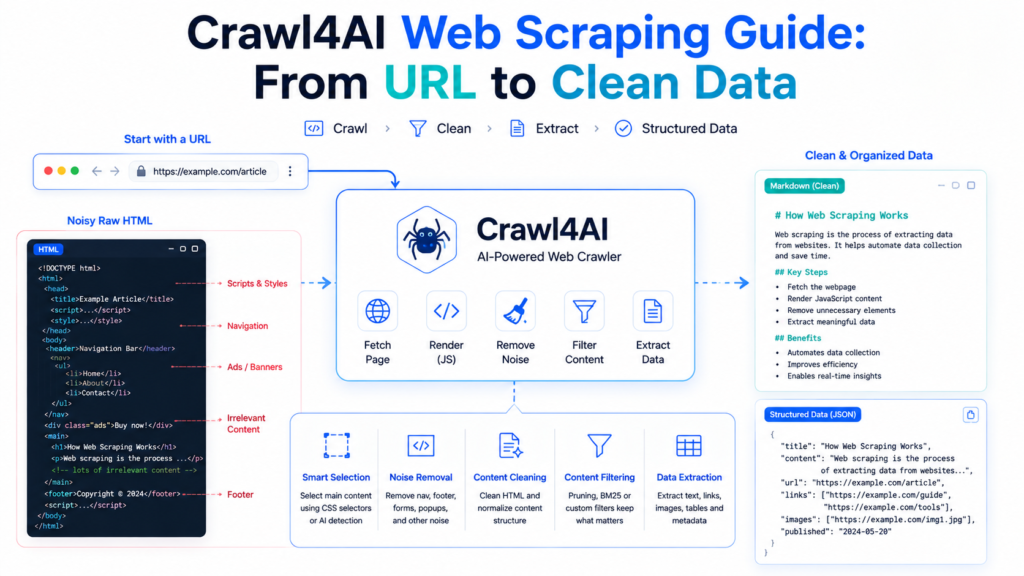
Crawl4AI turns a webpage URL into cleaner, more useful data by combining browser-based crawling with content selection, HTML cleanup, Markdown generation, filtering, and result validation. Effective web scraping is not simply about downloading a page; useful scraping separates meaningful content from navigation menus, forms, footers, repeated interface elements, tracking links, and other webpage noise.
Crawl4AI provides several stages for controlling that process, allowing developers to move from a raw webpage toward cleaned HTML, focused Markdown, links, media, tables, or application-ready content. This guide focuses specifically on that URL → crawl → select → clean → filter → validate → clean data workflow rather than installation or basic Python setup.
What Does “Clean Data” Mean in Web Scraping?
Raw webpage HTML contains much more than the information visible in an article or content area.
Typical pages can contain:
- Navigation menus
- Headers and footers
- Cookie interfaces
- Forms
- Sidebars
- Related links
- Scripts and styles
- Tracking elements
- Repeated buttons
- Main content
- Images and other media
Clean data keeps the information needed by your project while reducing irrelevant page structure.
Crawl4AI exposes multiple representations of a crawled page. result.html preserves original HTML, while result.cleaned_html it provides sanitized HTML after applicable cleanup rules. Markdown output provides a text-oriented representation suitable for many downstream workflows.
Start with the Target URL
A clean-data workflow should begin by defining exactly what information is needed from the target page.
Consider an article page. A project might need:
Title + article body + useful links
Collecting every navigation link, footer item, form, script, and decorative element would add data without adding value.
A simple crawl can first reveal what the page returns:
import asyncio
from crawl4ai import AsyncWebCrawler

async def main():
    url = "https://example.com"

    async with AsyncWebCrawler() as crawler:
        result = await crawler.arun(url)

        if result.success:
            print("URL:", result.url)
            print(result.markdown[:1000])
        else:
            print("Error:", result.error_message)

asyncio.run(main())
Initial inspection helps determine whether the default result is already clean enough or requires more precise filtering.
Understand the CrawlResult
CrawlResult acts as the main container for information collected during a crawl.
Important fields include:
urlsuccesshtmlcleaned_htmlmarkdownlinksmediametadatatablesextracted_contenterror_message
Different fields solve different problems.

html is useful when exact source markup matters. cleaned_html is better when scripts, styles, or configured unwanted elements should be removed. markdown is often more useful for text processing. links and media provide separately organized discovered resources.
Choosing the correct output prevents unnecessary processing later.
Raw HTML vs Cleaned HTML vs Markdown
Understanding these three outputs is important when designing a scraper.
Raw HTML
Raw HTML preserves the page source collected by the crawler.
raw_html = result.htmlRaw HTML is useful for debugging, custom parsing, or inspecting elements that disappeared during cleanup.
Cleaned HTML
Cleaned HTML provides a sanitized representation.
clean_html = result.cleaned_htmlCleanup configuration can remove unwanted page elements before the cleaned result is produced.
Markdown
Markdown converts webpage content into a more text-friendly structure.
markdown = result.markdownHeadings, paragraphs, lists, links, and other meaningful text structures can remain without carrying the complete HTML markup.
No single output is always best. Source-analysis tools may prefer HTML, while text processing often benefits from Markdown.
Target Only the Relevant Content
Scraping the complete document is unnecessary when useful content lives inside one predictable region.
css_selector can focus processing on a specific part of the page.
import asyncio
from crawl4ai import AsyncWebCrawler, CrawlerRunConfig

async def main():
    config = CrawlerRunConfig(
        css_selector="main"
    )

    async with AsyncWebCrawler() as crawler:
        result = await crawler.arun(
            "https://example.com",
            config=config
        )

        if result.success:
            print(result.markdown)

asyncio.run(main())
Possible selectors include:
main
article
#content
.main-content
.article-body
Actual selectors must come from the target page rather than being guessed.

Content targeting is often the first major cleanup step because irrelevant sections never need to enter later processing.
Remove Unwanted Page Sections
Some pages do not have one convenient container for all useful content.
excluded_tags can remove entire HTML tag categories.
Example:
from crawl4ai import CrawlerRunConfig

config = CrawlerRunConfig(
    excluded_tags=[
        "nav",
        "footer",
        "form",
        "aside"
    ]
)
Crawl4AI applies configured exclusions while producing cleaned content. Official documentation demonstrates this approach for removing forms, headers, footers, and other unwanted sections.
Exclusions should remain purposeful. Removing a tag globally can accidentally discard useful information if the website uses that element inside its primary content.
Remove Overlays and Page Obstructions
Webpages can contain modal dialogs, popups, cookie overlays, or other elements that interfere with browser-based content access.
Crawl configuration supports:
config = CrawlerRunConfig(
    remove_overlay_elements=True
)
Overlay removal can be useful when an obstruction covers or interferes with the page content during browser rendering.
This option should not be treated as a way to bypass access controls. Scraping should remain consistent with applicable site rules and permissions.
Reduce Link Noise
Pages can contain large numbers of external or irrelevant links.
Crawl4AI provides configuration options for controlling link-related output. Clean-data projects can exclude unnecessary domains or external links when those resources are not required.
Link data itself is available through:
internal = result.links.get("internal", [])
external = result.links.get("external", [])
Each link can contain fields such as its URL, text, title, and base domain.
Keeping link output focused can improve site audits, knowledge-base collection, and content datasets where third-party destinations provide little value.
Control Image and Media Processing
Image-heavy pages can increase processing requirements even when a project only needs text.
Crawl4AI supports:
config = CrawlerRunConfig(
    exclude_external_images=True
)
This attempts to retain images associated with the target site while excluding external images.
Text-only projects can go further:
config = CrawlerRunConfig(
    exclude_all_images=True
)
Official documentation notes that excluding all images early can improve memory efficiency and processing speed when image data is unnecessary.
Media should therefore be collected because the project needs it—not simply because the page contains it.
Generate Cleaner Markdown
Default Markdown is useful, but some pages still produce excessive text because boilerplate remains semantically valid HTML.
Content filtering provides another cleanup layer.
Crawl4AI supports filters including:
PruningContentFilterBM25ContentFilter- Custom relevant-content filters
Filtering happens before the final focused Markdown is produced.
This creates a useful distinction:
Raw Markdown = broader converted webpage content
Fit Markdown = content retained after relevance filtering
Fit Markdown can be accessed through:
result.markdown.fit_markdownClean Content with PruningContentFilter
PruningContentFilter is useful when the goal is to identify substantial page content without providing a search query.
Example:
from crawl4ai import CrawlerRunConfig
from crawl4ai.content_filter_strategy import PruningContentFilter
from crawl4ai.markdown_generation_strategy import DefaultMarkdownGenerator

content_filter = PruningContentFilter(
    threshold=0.45,
    threshold_type="dynamic",
    min_word_threshold=5
)

markdown_generator = DefaultMarkdownGenerator(
    content_filter=content_filter
)

config = CrawlerRunConfig(
    markdown_generator=markdown_generator
)
After crawling:
clean_data = result.markdown.fit_markdownPruning evaluates page blocks using signals such as content density and structure to reduce weaker or boilerplate content.
Thresholds should be tested against real pages. Excessive pruning can remove useful paragraphs alongside noise.

Extract Query-Relevant Content with BM25
Some scraping tasks need information related to one topic rather than the entire page.
BM25ContentFilter can rank/filter content against a user query.
from crawl4ai.content_filter_strategy import BM25ContentFilter
from crawl4ai.markdown_generation_strategy import DefaultMarkdownGenerator
from crawl4ai import CrawlerRunConfig

content_filter = BM25ContentFilter(
    user_query="machine learning",
    bm25_threshold=1.2,
    language="english"
)

markdown_generator = DefaultMarkdownGenerator(
    content_filter=content_filter
)

config = CrawlerRunConfig(
    markdown_generator=markdown_generator
)
BM25 is particularly useful when a long page contains many subjects but only blocks related to a known topic are required. Crawl4AI’s documentation recommends BM25 when a search query is available.
Pruning and BM25 therefore solve different cleanup problems.

Build a Practical Clean-Data Configuration
Several cleanup techniques can be combined.
import asyncio

from crawl4ai import (
    AsyncWebCrawler,
    CrawlerRunConfig,
    CacheMode
)
from crawl4ai.content_filter_strategy import PruningContentFilter
from crawl4ai.markdown_generation_strategy import DefaultMarkdownGenerator

async def main():

    content_filter = PruningContentFilter(
        threshold=0.45,
        threshold_type="dynamic",
        min_word_threshold=5
    )

    markdown_generator = DefaultMarkdownGenerator(
        content_filter=content_filter
    )

    config = CrawlerRunConfig(
        css_selector="main",
        excluded_tags=["nav", "footer", "aside", "form"],
        exclude_external_images=True,
        remove_overlay_elements=True,
        markdown_generator=markdown_generator,
        cache_mode=CacheMode.BYPASS
    )

    async with AsyncWebCrawler() as crawler:
        result = await crawler.arun(
            "https://example.com",
            config=config
        )

        if result.success:
            print(result.markdown.fit_markdown)
        else:
            print(result.error_message)

asyncio.run(main())
This example demonstrates the overall principle rather than a universal configuration.
A real scraper should adapt selectors and exclusions to the target website.
Use CacheMode Correctly
Testing a cleaning configuration against stale cached content can create confusion.
Crawl4AI’s current cache API uses CacheMode.
Fresh testing can use:
from crawl4ai import CacheMode

config = CrawlerRunConfig(
    cache_mode=CacheMode.BYPASS
)
Other supported modes include enabled, disabled, read-only, and write-only behavior. Older boolean cache flags have been replaced by the CacheMode approach.
Caching becomes valuable for repeated workflows, while bypassing cache is useful when fresh page content is required during testing.
Validate Data Before Saving It
A successful crawl does not automatically mean the dataset is useful.
Validation should check:
- Crawl success
- Final URL
- Content presence
- Expected headings or fields
- Minimum useful content length
- Duplicate content
- Missing sections
- Unexpected error pages
Example:
if not result.success:
    print("Crawl failed")
elif not result.markdown.fit_markdown.strip():
    print("No useful content found")
else:
    clean_data = result.markdown.fit_markdown
    print("Clean data ready")
Validation becomes especially important in large datasets because a browser can successfully load a login page, bot-warning page, empty template, or unexpected redirect.
Technical success and data quality are different checks.
Save Only the Output You Need
Clean-data pipelines should avoid storing every intermediate representation unless debugging or auditing requires them.
Text-oriented project:
from pathlib import Path

Path("clean-data.md").write_text(
    result.markdown.fit_markdown,
    encoding="utf-8"
)
HTML-oriented project:
Path("clean-page.html").write_text(
    result.cleaned_html,
    encoding="utf-8"
)
Storage choices should reflect downstream requirements.
Saving raw HTML, cleaned HTML, Markdown, screenshots, and every media object for every URL can unnecessarily increase storage and processing costs.
Complete URL-to-Clean-Data Workflow
A practical Crawl4AI scraping pipeline can be summarized as:
Target URL → Browser Crawl → Select Relevant Area → Remove Unwanted Elements → Clean HTML → Generate Markdown → Apply Content Filter → Validate → Save Clean Data
Each stage solves a different problem.
URL selection determines scope. Content targeting removes broad noise. HTML cleanup eliminates unwanted structures. Markdown makes text easier to process. Relevance filters reduce remaining boilerplate. Validation prevents poor results from entering the final dataset.
Skipping these decisions often produces large datasets that contain plenty of text but little useful information.

Common Clean-Data Problems
Navigation Still Appears in Output
Target the primary content area with css_selector or exclude appropriate structural elements.
Useful Content Disappears
Filtering may be too aggressive. Reduce pruning strength or inspect cleaned HTML to determine which stage removed the content.
Output Contains Too Many External Links
Use link filtering or process only the internal portion of result.links.
Images Consume Unnecessary Resources
Use exclude_external_images or exclude_all_images when image data is not required.
Page Content Looks Outdated
Test with CacheMode.BYPASS when fresh retrieval matters.
Crawl Succeeds, but Dataset Is Empty
Inspect result.html and result.cleaned_html first. A selector may not match, dynamic content may not have loaded, or a filter may have removed too much.
Crawl4AI Web Scraping FAQ
Can Crawl4AI remove navigation and footer content?
Yes. Content targeting, excluded tags, and filtering strategies can reduce unwanted page sections.
What is cleaned HTML in Crawl4AI?
cleaned_html is a sanitized HTML representation generated after Crawl4AI applies relevant cleanup and exclusion rules.
What is fit Markdown?
Fit Markdown is the focused Markdown retained after a configured content filter processes the page. It is available through result.markdown.fit_markdown.
Should I use PruningContentFilter or BM25ContentFilter?
Pruning works well for reducing general page noise without a specific query. BM25 is better when content should be selected for relevance to a known search term.
Can Crawl4AI ignore images?
Yes. External images or all images can be excluded when they are unnecessary.
Should raw HTML always be saved?
No. Raw HTML is useful for debugging and specialized processing, but storing it is unnecessary when a project only needs cleaned Markdown or another final output.
Conclusion
Crawl4AI turns web scraping into a controlled data-cleaning process when each stage has a clear purpose. Raw HTML can be preserved for debugging, cleaned HTML can remove unwanted structures, CSS targeting can isolate important sections, and Markdown filtering can reduce the remaining boilerplate before content enters a dataset.
Crawl4AI produces better clean-data workflows when developers collect only what their application actually needs. Focused selectors, sensible exclusions, appropriate content filters, fresh-cache settings when required, and final validation transform a basic URL crawl into a reliable URL-to-clean-data pipeline.