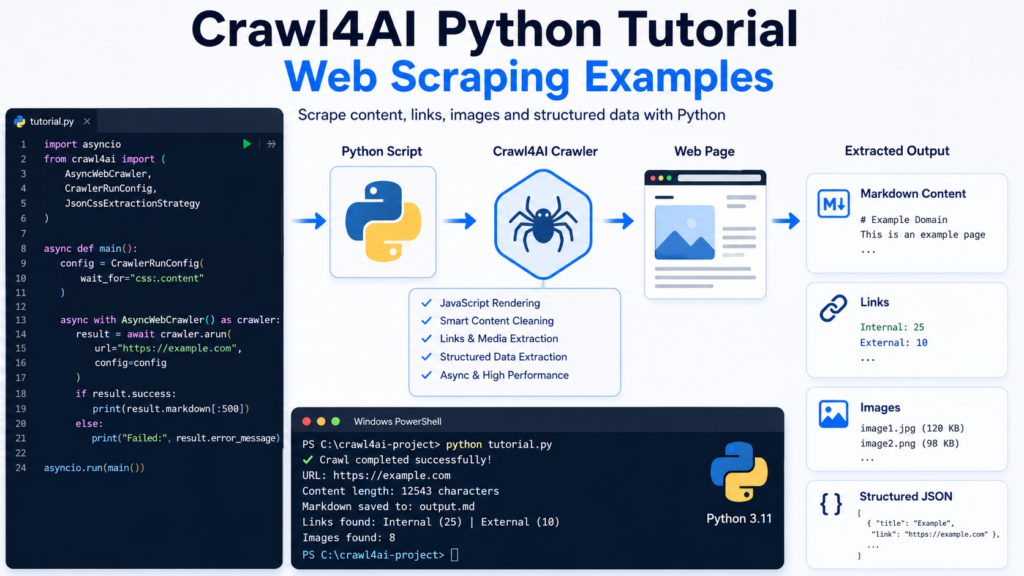
Crawl4AI gives Python developers a practical way to turn webpages into usable content without manually handling every browser, parsing, and cleanup step. Python scripts can crawl single pages, process multiple URLs, extract links and media, interact with JavaScript-driven pages, and return structured information that can be saved or passed into another application.
Crawl4AI becomes especially useful when a project needs more than raw HTML. Clean Markdown, page metadata, discovered links, media information, and structured fields can all become part of a Python scraping workflow. Examples below move from a simple page crawl toward reusable scraping patterns suitable for real development projects.
Understanding the Python Crawling Pattern
Most Crawl4AI Python projects revolve around AsyncWebCrawler.
Python’s asyncio module manages the asynchronous workflow, while AsyncWebCrawler performs crawling operations.
A basic pattern looks like this:
import asyncio
from crawl4ai import AsyncWebCrawler

async def main():
    async with AsyncWebCrawler() as crawler:
        result = await crawler.arun(
            url="https://example.com"
        )

        if result.success:
            print(result.markdown)

asyncio.run(main())
async with manages the crawler lifecycle automatically. arun() processes one URL and returns a crawl result containing the processed page information.
Keeping crawler creation outside repeated operations becomes especially useful when several pages need to be processed in the same script.
Example 1: Scrape Page Text as Markdown
Readable page content often provides a better starting point than raw HTML.
import asyncio
from crawl4ai import AsyncWebCrawler

async def scrape_page():
    async with AsyncWebCrawler() as crawler:
        result = await crawler.arun(
            "https://example.com"
        )

        if result.success:
            print(result.markdown[:1000])
        else:
            print(result.error_message)

asyncio.run(scrape_page())
result.markdown contains Crawl4AI’s Markdown representation of the crawled page.

Limiting displayed output with [:1000] keeps terminal testing manageable while still confirming that relevant content was collected.
Markdown output can later be saved to a file, indexed, transformed, analyzed, or sent to another processing stage.
Example 2: Access Raw and Cleaned HTML
Markdown is not always the required output. HTML remains useful when a developer needs to inspect document structure or build custom processing logic.
import asyncio
from crawl4ai import AsyncWebCrawler

async def inspect_html():
    async with AsyncWebCrawler() as crawler:
        result = await crawler.arun(
            "https://example.com"
        )

        if result.success:
            print("Raw HTML:")
            print(result.html[:500])

            print("\nCleaned HTML:")
            print(result.cleaned_html[:500])

asyncio.run(inspect_html())
Raw HTML represents the page collected during crawling, while cleaned HTML provides a processed form suitable for further analysis.
Choosing between Markdown and HTML should depend on what the next part of the application expects.
Example 3: Extract Internal and External Links
Web scraping projects frequently need links in addition to page text.
Crawl results can include discovered links grouped into categories such as internal and external URLs.
import asyncio
from crawl4ai import AsyncWebCrawler

async def extract_links():
    async with AsyncWebCrawler() as crawler:
        result = await crawler.arun(
            "https://example.com"
        )

        if result.success:
            internal_links = result.links.get("internal", [])
            external_links = result.links.get("external", [])

            print("Internal links:")
            for link in internal_links[:10]:
                print(link.get("href"))

            print("\nExternal links:")
            for link in external_links[:10]:
                print(link.get("href"))

asyncio.run(extract_links())
Link extraction can support site audits, content discovery, crawling queues, documentation indexing, or internal-link analysis.
URLs should still be validated before automatically following them because pages can contain tracking URLs, duplicates, fragments, or irrelevant destinations.
Example 4: Extract Images and Media
Media information can also be available in a crawl result.
import asyncio
from crawl4ai import AsyncWebCrawler

async def extract_images():
    async with AsyncWebCrawler() as crawler:
        result = await crawler.arun(
            "https://example.com"
        )

        if result.success:
            images = result.media.get("images", [])

            for image in images[:10]:
                print("Source:", image.get("src"))
                print("Alt:", image.get("alt"))
                print("---")

asyncio.run(extract_images())
Image extraction can help when building media inventories, checking image metadata, collecting article assets, or auditing alt text.

A production script should avoid assuming that every image contains every possible field. Using .get() prevents missing dictionary keys from immediately stopping the program.
Example 5: Scrape a Specific Page Section
Full-page extraction can produce unnecessary content when only one section matters.
CrawlerRunConfig can narrow processing to a selected CSS region.
import asyncio
from crawl4ai import AsyncWebCrawler, CrawlerRunConfig

async def scrape_section():
    config = CrawlerRunConfig(
        css_selector="main"
    )

    async with AsyncWebCrawler() as crawler:
        result = await crawler.arun(
            url="https://example.com",
            config=config
        )

        if result.success:
            print(result.markdown)

asyncio.run(scrape_section())
A selector such as main, article, .content, or another verified page selector can reduce unrelated navigation and footer content.
CSS selectors must match the current webpage structure. Website redesigns can therefore require selector updates.
Example 6: Extract Structured Data with CSS Selectors
Repeated page elements often need predictable fields rather than one long Markdown document.
JsonCssExtractionStrategy can map CSS selectors to structured fields.
import asyncio
import json

from crawl4ai import (
    AsyncWebCrawler,
    CrawlerRunConfig,
    JsonCssExtractionStrategy
)

async def extract_items():
    schema = {
        "name": "Items",
        "baseSelector": ".item",
        "fields": [
            {
                "name": "title",
                "selector": "h2",
                "type": "text"
            },
            {
                "name": "link",
                "selector": "a",
                "type": "attribute",
                "attribute": "href"
            }
        ]
    }

    config = CrawlerRunConfig(
        extraction_strategy=JsonCssExtractionStrategy(schema)
    )

    async with AsyncWebCrawler() as crawler:
        result = await crawler.arun(
            "https://example.com",
            config=config
        )

        if result.success and result.extracted_content:
            data = json.loads(result.extracted_content)
            print(json.dumps(data, indent=2))

asyncio.run(extract_items())
baseSelector Identifies each repeated record. Individual fields then describe what should be collected from each record.

Structured extraction works especially well for predictable layouts such as article cards, documentation lists, catalog pages, directories, and repeated data blocks.
Selector accuracy matters more than writing a large schema. Inspecting the actual page HTML before defining selectors normally produces cleaner results.
Example 7: Crawl Multiple URLs with Python
Processing URLs one at a time becomes inefficient when a project contains many independent pages.
Crawl4AI provides arun_many() for multi-URL crawling.
import asyncio
from crawl4ai import AsyncWebCrawler

async def crawl_many_pages():
    urls = [
        "https://example.com",
        "https://example.org",
        "https://example.net"
    ]

    async with AsyncWebCrawler() as crawler:
        results = await crawler.arun_many(urls)

        for result in results:
            if result.success:
                print("URL:", result.url)
                print(result.markdown[:200])
                print("=" * 50)
            else:
                print("Failed:", result.url)

asyncio.run(crawl_many_pages())
Batch crawling allows Crawl4AI to manage multiple requests more efficiently than repeatedly creating a completely new crawler for every URL.

Large workloads still need sensible concurrency and resource limits. More simultaneous pages do not automatically mean better performance when memory, CPU, bandwidth, or target-server limits become bottlenecks.
Example 8: Process Multi-URL Results as They Arrive
Streaming becomes useful when results should be processed without waiting for an entire batch to finish.
import asyncio
from crawl4ai import AsyncWebCrawler, CrawlerRunConfig

async def stream_pages():
    urls = [
        "https://example.com",
        "https://example.org",
        "https://example.net"
    ]

    config = CrawlerRunConfig(
        stream=True
    )

    async with AsyncWebCrawler() as crawler:
        async for result in await crawler.arun_many(
            urls,
            config=config
        ):
            if result.success:
                print("Finished:", result.url)

asyncio.run(stream_pages())
Streaming can help long-running jobs begin saving or processing completed pages immediately.
Crawl4AI dispatchers provide additional controls for larger workloads where concurrency, rate limiting, and memory management become important.
Example 9: Handle JavaScript-Rendered Content
Modern websites often update content after the initial page load.
CrawlerRunConfig supports JavaScript execution and waiting conditions for these situations.
import asyncio
from crawl4ai import AsyncWebCrawler, CrawlerRunConfig

async def crawl_dynamic_page():
    config = CrawlerRunConfig(
        wait_for="css:.loaded-content"
    )

    async with AsyncWebCrawler() as crawler:
        result = await crawler.arun(
            url="https://example.com",
            config=config
        )

        if result.success:
            print(result.markdown)

asyncio.run(crawl_dynamic_page())
wait_for should target an element that reliably indicates the desired content has appeared.

Pages requiring interaction can also use JavaScript.
config = CrawlerRunConfig(
    js_code="""
        document.querySelector('.load-more')?.click();
    """,
    wait_for="css:.new-content"
)
JavaScript interaction should remain targeted. Complex scripts with unnecessary clicks and delays make scraping slower and harder to maintain.
Example 10: Save Crawled Markdown to a File
Scraped content often needs persistent storage rather than terminal output.
import asyncio
from pathlib import Path
from crawl4ai import AsyncWebCrawler

async def save_markdown():
    async with AsyncWebCrawler() as crawler:
        result = await crawler.arun(
            "https://example.com"
        )

        if result.success:
            output = Path("example-page.md")
            output.write_text(
                str(result.markdown),
                encoding="utf-8"
            )

            print(f"Saved to {output}")

asyncio.run(save_markdown())
UTF-8 encoding helps preserve non-English characters and special symbols correctly.
File names should ideally come from a controlled slug or identifier rather than directly inserting an untrusted webpage title into a filesystem path.
Example 11: Save Structured Data as JSON
Structured extraction can be stored as a JSON file for later use.
import asyncio
from pathlib import Path
from crawl4ai import AsyncWebCrawler

async def save_page_data():
    async with AsyncWebCrawler() as crawler:
        result = await crawler.arun(
            "https://example.com"
        )

        if result.success:
            data = {
                "url": result.url,
                "success": result.success,
                "markdown": str(result.markdown)
            }

            import json

            Path("crawl-result.json").write_text(
                json.dumps(data, indent=2, ensure_ascii=False),
                encoding="utf-8"
            )

asyncio.run(save_page_data())
JSON becomes useful when crawler output needs to move into another script, API, database import process, or data-processing pipeline.
Example 12: Build a Reusable Crawl Function
Larger projects benefit from reusable functions instead of duplicating crawler code.
import asyncio
from crawl4ai import AsyncWebCrawler

async def crawl_url(crawler, url):
    result = await crawler.arun(url)

    if not result.success:
        return {
            "url": url,
            "success": False,
            "error": result.error_message
        }

    return {
        "url": result.url,
        "success": True,
        "markdown": str(result.markdown)
    }

async def main():
    urls = [
        "https://example.com",
        "https://example.org"
    ]

    async with AsyncWebCrawler() as crawler:
        for url in urls:
            data = await crawl_url(crawler, url)
            print(data["url"], data["success"])

asyncio.run(main())
A reusable function creates one place for error handling, validation, logging, and output formatting.

Future changes can then be applied once instead of editing every crawling block separately.
Python Error Handling for Web Scraping
Network requests, browser rendering, JavaScript, selectors, and remote websites can all fail.
Reliable scripts should expect failure.
import asyncio
from crawl4ai import AsyncWebCrawler

async def safe_crawl(url):
    try:
        async with AsyncWebCrawler() as crawler:
            result = await crawler.arun(url)

            if not result.success:
                print(
                    f"Crawl failed: {result.error_message}"
                )
                return

            print(result.markdown[:500])

    except Exception as exc:
        print(f"Unexpected error: {exc}")

asyncio.run(
    safe_crawl("https://example.com")
)
Production systems should also log failures, retain failed URLs for controlled retries, and validate extracted fields before saving them.
Repeated retries without limits can make a failing scraper worse rather than more reliable.
Crawl4AI Python Best Practices
Crawler reuse reduces unnecessary browser creation when processing several pages during one job.
Selectors should target stable structural elements rather than fragile styling classes whenever possible. Structured output should be validated before downstream systems assume required fields exist.
Batch size and concurrency should remain appropriate for available system resources and the target website. Responsible scraping also requires respecting site policies, access restrictions, and applicable terms.
Browser interaction should only be added when static crawling cannot expose the required content. Simpler workflows remain easier to test, maintain, and debug.
Crawl4AI Python FAQ
Can Crawl4AI scrape multiple URLs with Python?
Yes. arun_many() Supports multi-URL crawling and can also stream results when streaming is enabled.
Can Crawl4AI extract links from webpages?
Yes. Crawl results can include internal and external link information.
Can Crawl4AI extract images?
Yes. Media output can contain image information such as source URLs and available metadata.
Can Crawl4AI use CSS selectors?
Yes. CSS selectors can limit page content and support schema-based structured extraction.
Can Crawl4AI scrape JavaScript websites?
Yes. Browser-based crawling supports waiting conditions and JavaScript execution for dynamic content.
Can Crawl4AI save results as JSON?
Yes. Python can write Crawl4AI output or extracted structured content into JSON files, databases, or other storage systems.
Does every Crawl4AI project need structured extraction?
No. Markdown can be enough for text-oriented projects, while structured extraction is more useful when predictable fields are required.
Conclusion
Crawl4AI gives Python developers a flexible scraping workflow that can begin with a single arun() call and expand into link discovery, media extraction, CSS-targeted content, structured JSON, JavaScript interaction, and multi-URL crawling. Practical projects benefit most when the output format and crawling method match the actual data requirement instead of enabling unnecessary complexity.
Crawl4AI Python workflows become easier to maintain when crawler instances are reused, selectors remain focused, failures are handled explicitly, and results are validated before storage. Reusable functions and controlled batch processing can then turn individual scraping examples into dependable components for larger web-data projects.