
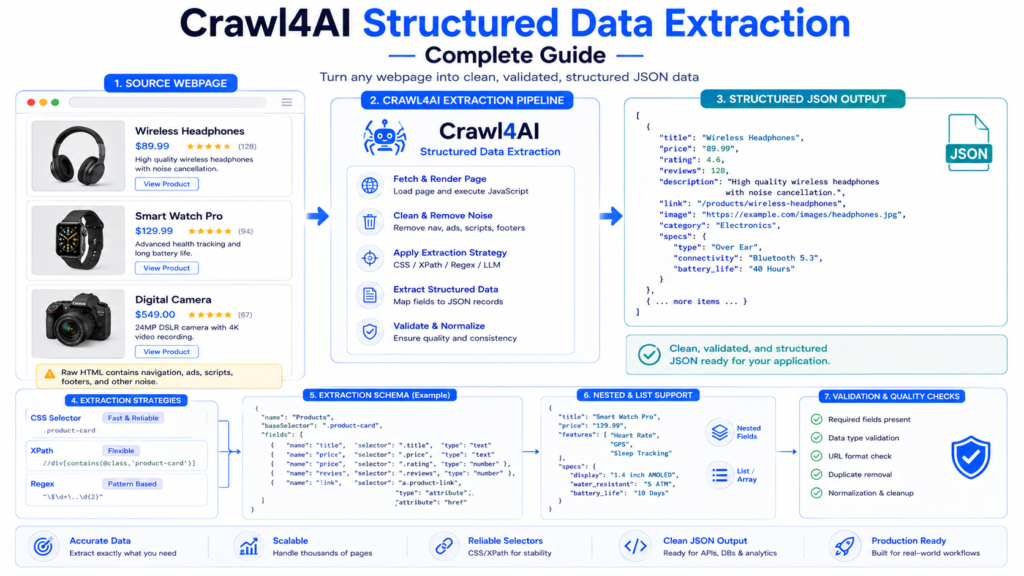
Crawl4AI structured data extraction turns webpage elements into predictable records that applications can process directly. Instead of returning an entire page as text, a structured extraction workflow can identify repeated items such as products, articles, jobs, prices, links, authors, specifications, or table-like records and map them into named JSON fields.
Crawl4AI supports several approaches depending on the structure of the source. CSS and XPath schemas provide fast, deterministic extraction for consistent HTML, Regex handles recognizable text patterns, and LLM-based extraction can interpret irregular or semantically complex content. Choosing the simplest reliable strategy is usually more important than choosing the most sophisticated one.
What Is Structured Data Extraction?
Consider a webpage containing repeated product cards:
<div class="product-card">
    <h2 class="title">Mechanical Keyboard</h2>
    <span class="price">$89.00</span>
    <a class="product-link" href="/keyboard">View Product</a>
</div>
A normal text extraction might return:
Mechanical Keyboard
$89.00
View Product
Structured extraction can instead produce:
[
  {
    "title": "Mechanical Keyboard",
    "price": "$89.00",
    "link": "/keyboard"
  }
]
The second form is much easier to validate, save, search, analyze, or insert into another system.
Structured extraction therefore answers a different question from Markdown generation.
Markdown asks:
“What useful content is on this page?”
Structured extraction asks:
“Which exact fields do I need from each record?”
Choose the Right Crawl4AI Extraction Strategy
Crawl4AI provides multiple extraction strategies.
A useful starting decision is:
| Data Situation | Strategy |
|---|---|
| Repeated, consistent HTML | JsonCssExtractionStrategy |
| XPath is better suited to the document | JsonXPathExtractionStrategy |
| Emails, URLs, dates or predictable text patterns | RegexExtractionStrategy |
| Irregular or semantically complex information | LLMExtractionStrategy |

Official Crawl4AI guidance recommends CSS/XPath for consistent page structures and LLM extraction when semantic interpretation is actually necessary.
That distinction matters because deterministic extraction normally offers better speed, repeatability, and cost efficiency.
Understand the Extraction Schema
Schema-based extraction has two main levels:
Base Selector
    ↓
Repeated Record
    ↓
Fields inside each record
A simple schema looks like this:
schema = {
    "name": "Products",
    "baseSelector": ".product-card",
    "fields": [
        {
            "name": "title",
            "selector": ".title",
            "type": "text"
        },
        {
            "name": "price",
            "selector": ".price",
            "type": "text"
        }
    ]
}
baseSelector identifies every repeated item.
If a page contains 20 elements matching:
.product-cardCrawl4AI can treat those elements as 20 potential records.
Each object in fields describes what should be extracted from inside each base element. Crawl4AI’s schema-based extraction supports CSS and XPath versions of this pattern.
Extract Structured JSON with CSS Selectors
CSS extraction is a strong default when the target HTML has stable classes, IDs, attributes, or element relationships.
A complete example:
import asyncio
import json

from crawl4ai import (
    AsyncWebCrawler,
    CrawlerRunConfig,
    JsonCssExtractionStrategy
)

async def main():

    schema = {
        "name": "Product Catalog",
        "baseSelector": ".product-card",
        "fields": [
            {
                "name": "title",
                "selector": ".title",
                "type": "text"
            },
            {
                "name": "price",
                "selector": ".price",
                "type": "text"
            },
            {
                "name": "link",
                "selector": "a.product-link",
                "type": "attribute",
                "attribute": "href"
            }
        ]
    }

    strategy = JsonCssExtractionStrategy(
        schema=schema
    )

    config = CrawlerRunConfig(
        extraction_strategy=strategy
    )

    async with AsyncWebCrawler() as crawler:

        result = await crawler.arun(
            url="https://example.com",
            config=config
        )

        if result.success and result.extracted_content:

            data = json.loads(
                result.extracted_content
            )

            print(
                json.dumps(
                    data,
                    indent=2,
                    ensure_ascii=False
                )
            )

asyncio.run(main())
The important distinction is that structured extraction output is retrieved from:
result.extracted_contentnot from the Markdown field. Crawl4AI documents extracted_content as the location for JSON-based CSS, XPath, LLM, and similar extraction results.
Extract Text Fields
Text is one of the most common field types.
Example HTML:
<h2 class="product-title">
    Wireless Mouse
</h2>
Schema:
{
    "name": "title",
    "selector": ".product-title",
    "type": "text"
}
Expected value:
{
  "title": "Wireless Mouse"
}
Text fields work well for:
- Titles
- Prices displayed as text
- Author names
- Categories
- Descriptions
- Ratings
- Labels
Selectors should target the smallest stable element containing the required value.
Extract HTML Attributes
Some information lives in attributes rather than visible text.
Example:
<a class="product-link"
   href="/products/mouse">
   View
</a>
Schema:
{
    "name": "link",
    "selector": "a.product-link",
    "type": "attribute",
    "attribute": "href"
}
Output:
{
  "link": "/products/mouse"
}
The same technique can extract values such as:
href
src
title
data-id
data-price
Attribute extraction is particularly useful for links, images, and machine-readable values stored in data-* attributes.
Extract HTML Blocks
Sometimes preserving markup is more useful than converting a field into plain text.
Conceptually:
{
    "name": "description_html",
    "selector": ".description",
    "type": "html"
}
This can preserve nested markup inside the selected section.
HTML fields are useful when downstream processing needs formatting, nested elements, or custom parsing that would be lost by text-only extraction.

Extract Lists
A single record can contain repeated child elements.
Example:
<div class="product-card">

    <h2>Gaming Laptop</h2>

    <ul class="features">
        <li>16GB RAM</li>
        <li>1TB SSD</li>
        <li>144Hz Display</li>
    </ul>

</div>
The desired output might be:
{
  "title": "Gaming Laptop",
  "features": [
    "16GB RAM",
    "1TB SSD",
    "144Hz Display"
  ]
}
List and nested field capabilities allow the schema to represent hierarchical page structures rather than flattening everything into one text value. Crawl4AI’s schema extraction documentation explicitly supports nested and list types for repeated or hierarchical data.
Extract Nested Data
Real pages often contain structures such as:
Product
 ├── Title
 ├── Price
 ├── Seller
 │    ├── Name
 │    └── Rating
 └── Features[]
Flattening every value can make complex datasets harder to understand.
A better output might be:
{
  "title": "Laptop",
  "price": "$999",
  "seller": {
    "name": "Example Seller",
    "rating": "4.8"
  },
  "features": [
    "16GB RAM",
    "1TB SSD"
  ]
}
Nested schemas are useful for:
- Product specifications
- Seller information
- Author profiles
- Job requirements
- Article metadata
- Review collections
- Category trees
The JSON structure should reflect how the downstream application naturally understands the data.
Use Stable Selectors
Selector quality determines extraction reliability.
A fragile selector might look like:
div:nth-child(4) > div:nth-child(2) > spanA more stable selector could be:
.product-card .priceor:
a[href*="/product/"]Stable selectors normally rely on semantic classes, IDs, attributes, or consistent structural relationships.
Crawl4AI’s current schema-generation guidance specifically recommends stable attributes instead of fragile positional selectors when page layouts vary.
Handle Data Stored in Sibling Elements
Some websites split one logical record across sibling elements.
For example:
<tr class="item">
    <td class="title">Article Title</td>
</tr>

<tr class="metadata">
    <td class="score">250 points</td>
    <td class="author">Alex</td>
</tr>
The title and metadata belong together, but the metadata is not a child of the first row.
Crawl4AI supports a source field that can move to another element before applying the field selector.
Current documentation demonstrates sibling extraction patterns such as:
{
    "name": "score",
    "selector": "span.score",
    "type": "text",
    "source": "+ tr"
}
The source mechanism works with multiple field types in CSS and XPath strategies.
This is useful for tables and layouts where related values are separated across adjacent DOM elements.
CSS vs XPath Extraction
CSS and XPath can often extract the same information.
CSS:
.product-card .titleXPath:
//div[contains(@class,'product-card')]//h2CSS selectors are often easier to read when a website already exposes meaningful classes and attributes.
XPath becomes useful when extraction requires more complex tree navigation or when an existing project already uses XPath extensively.
Crawl4AI provides both:
JsonCssExtractionStrategyand:
JsonXPathExtractionStrategyBoth use schema-driven extraction principles.
Use Regex for Predictable Patterns
Not every structured value needs a DOM schema.
Regex can work well for recognizable patterns such as:
- Email addresses
- URLs
- Dates
- Phone-like patterns
- Known identifiers
- Formatted prices
Crawl4AI provides RegexExtractionStrategy, including built-in patterns and support for custom regular expressions.
Example:
from crawl4ai import RegexExtractionStrategy

strategy = RegexExtractionStrategy(
    pattern=(
        RegexExtractionStrategy.Email |
        RegexExtractionStrategy.Url
    )
)
Custom patterns can also be supplied:
price_pattern = {
    "usd_price":
        r"\$\s?\d{1,3}(?:,\d{3})*(?:\.\d{2})?"
}

strategy = RegexExtractionStrategy(
    custom=price_pattern
)
Regex is efficient when the data format is predictable but should not replace DOM-aware extraction for complicated page structures.
Extract Data from Dynamic Pages
A perfect schema cannot extract an element that has not loaded yet.
Dynamic websites may require:
- Open page
- Wait for JavaScript
- Perform interaction
- Confirm content exists
- Apply extraction strategy
Example structure:
config = CrawlerRunConfig(
    wait_for="css:.product-card",
    extraction_strategy=(
        JsonCssExtractionStrategy(schema)
    )
)
Interaction can also be combined with extraction when content appears after actions such as pagination or “Load More.”
Crawl4AI’s page-interaction documentation explicitly supports combiningjs_code, waiting conditions, sessions, and an extraction strategy, then reading the structured result from result.extracted_content.

Parse extracted_content Safely
extracted_content is commonly returned as a JSON string.
Parse it before treating it as Python data:
import json

if result.success and result.extracted_content:

    try:
        data = json.loads(
            result.extracted_content
        )

    except json.JSONDecodeError as error:
        print(
            "Invalid extraction JSON:",
            error
        )
Then validate its shape:
if not isinstance(data, list):
    print("Unexpected data format")
Individual records can also be checked:
for item in data:

    title = item.get("title")
    price = item.get("price")

    if not title:
        print("Missing title")
Crawler success and extraction quality are separate conditions.
A successful page load can still produce zero records because a selector changed.
Validate Extracted Records
Validation should happen before data enters a database or API.
Example:
def valid_product(item):

    required = [
        "title",
        "price"
    ]

    return all(
        item.get(field)
        for field in required
    )
Then:
valid_items = [
    item
    for item in data
    if valid_product(item)
]
Useful validation checks include:
- Required fields exist
- Values are not empty
- URLs have expected formats
- Prices can be normalized
- Duplicate records are removed
- Record count is plausible
- Unexpected page templates are detected
Schema extraction is deterministic, but it is only as accurate as the selectors and validation rules surrounding it.

Save Structured Results as JSON
Validated records can be stored directly.
from pathlib import Path
import json

Path("products.json").write_text(
    json.dumps(
        valid_items,
        indent=2,
        ensure_ascii=False
    ),
    encoding="utf-8"
)
A JSON result can then feed:
Database imports
APIs
Analytics pipelines
Search indexes
Product monitoring
Knowledge systems
Data transformation jobs
Structured extraction is especially valuable when another program—not a human reader—is the primary consumer of the crawl result.
Generate an Extraction Schema
Manual schemas are preferable when selectors are obvious and stable.
Complex pages, however, can make schema discovery time-consuming.
Current Crawl4AI versions provide schema-generation capabilities on JsonCssExtractionStrategy and JsonXPathExtractionStrategy. The generator can use an LLM to inspect supplied HTML or a page and propose the schema; documentation also describes validation/refinement of generated selectors.
Conceptually:
schema = JsonCssExtractionStrategy.generate_schema(
    url="https://example.com",
    query="""
    Extract each product's title,
    price, image URL and product link.
    """
)
The generated schema can then be reused:
strategy = JsonCssExtractionStrategy(
    schema
)
This is an important optimization.
An LLM can help design a schema once, while repeated production crawls can continue using deterministic CSS extraction without an LLM call on every page.
Generated selectors should still be reviewed and tested before production use.
When LLMExtractionStrategy Makes Sense
CSS, XPath, and Regex depend on recognizable structures.
Some pages instead contain information like:
The Professional plan is intended for larger teams.
Pricing begins at $79 per month and includes advanced
reporting, priority support and additional integrations.
A project might need:
{
  "plan": "Professional",
  "starting_price": "$79 per month",
  "audience": "larger teams",
  "features": [
    "advanced reporting",
    "priority support",
    "additional integrations"
  ]
}
No single selector necessarily expresses the semantic relationship between those facts.
LLMExtractionStrategy is designed for these cases. Crawl4AI supports schema-driven LLM extraction, including Pydantic-generated JSON schemas.
Define an LLM Extraction Schema
Pydantic can describe the expected output:
from pydantic import BaseModel

class Plan(BaseModel):
    name: str
    price: str
    audience: str
    features: list[str]
Then:
schema = Plan.model_json_schema()A Crawl4AI LLM strategy can use that schema:
from crawl4ai import (
    LLMConfig,
    LLMExtractionStrategy
)

strategy = LLMExtractionStrategy(
    llm_config=LLMConfig(
        provider="YOUR_PROVIDER",
        api_token="YOUR_API_TOKEN"
    ),
    schema=Plan.model_json_schema(),
    extraction_type="schema",
    instruction="""
    Extract the plan name, price,
    intended audience and features.
    """
)
Current Crawl4AI uses LLMConfig for provider configuration. Older direct provider/API-token parameters were removed from LLMExtractionStrategy.
Control the LLM Input
LLM extraction can operate on different crawler outputs.
Documented input_format choices include:
markdown
fit_markdown
html
For example:
strategy = LLMExtractionStrategy(
    ...,
    input_format="fit_markdown"
)
fit_markdown can reduce input size when an earlier content filter reliably removes irrelevant content.
html can be better when the extraction instruction depends on markup.
markdown is the default text-oriented choice.
Crawl4AI also supports chunk thresholds and overlap for large documents.
CSS Extraction vs LLM Extraction
A common mistake is assuming AI extraction must be better because it is more advanced.
For predictable HTML:
CSS selector → exact element → exact valueis normally preferable.
LLM extraction adds:
Model inference
Token usage
Latency
Possible output variation
Additional validation requirements
A practical decision hierarchy is:
Stable HTML → CSS/XPath
Predictable text pattern → Regex
Semantic/unstructured information → LLM
Crawl4AI’s own strategy guidance follows this separation essentially.

Build a Production Extraction Pipeline
A reliable structured-data workflow can follow:
Target URL
    ↓
Load Required Content
    ↓
Identify Repeated Records
    ↓
Apply CSS / XPath / Regex Schema
    ↓
Parse extracted_content
    ↓
Validate Required Fields
    ↓
Normalize Values
    ↓
Remove Duplicates
    ↓
Save Structured JSON
LLM extraction should branch from this pipeline only when deterministic extraction cannot reliably represent the information.
This architecture keeps routine scraping predictable while preserving an AI option for genuinely semantic tasks.
Common Structured Extraction Problems
extracted_content Is Empty
Verify the baseSelector first.
A selector matching zero elements cannot produce records.
Some Fields Are Missing
Inspect selectors relative to the base element. A field selector may be searching in the wrong scope.
Extraction Breaks After a Site Update
Avoid fragile positional selectors and prefer stable classes, attributes, URLs, or semantic relationships.
Dynamic Items Are Missing
Wait for the relevant element or complete the required JavaScript interaction before extraction.
JSON Cannot Be Parsed
Catch json.JSONDecodeError, log the raw extraction result, and avoid sending malformed records downstream.
LLM Extraction Costs Too Much
Determine whether CSS, XPath, Regex, or fit_markdown can reduce or eliminate repeated LLM calls.
Duplicate Records Appear
Normalize a stable identifier such as a canonical URL, item ID, or another unique field and deduplicate before storage.
Crawl4AI Structured Data Extraction FAQ
Can Crawl4AI extract JSON without an LLM?
Yes. JsonCssExtractionStrategy, JsonXPathExtractionStrategy, and RegexExtractionStrategy support LLM-free extraction.
Where does structured extraction output appear?
Structured extraction is available through result.extracted_content, commonly as a JSON string.
Should I use CSS or XPath?
CSS is often simpler for class- and attribute-based webpages. XPath can be useful for more complex tree navigation. Both are supported.
Can Crawl4AI extract nested data?
Yes. Schema-based extraction supports nested and list structures for hierarchical records.
Can Crawl4AI extract dynamically loaded data?
Yes. JavaScript interaction and waiting conditions can be combined with extraction strategies.
Does Crawl4AI support Regex extraction?
Yes. RegexExtractionStrategy supports built-in and custom patterns.
When should LLM extraction be used?
LLM extraction is most appropriate when the required information is irregular, semantic, or difficult to represent reliably with CSS, XPath, or Regex.
Can Crawl4AI generate CSS extraction schemas?
Yes. Current documentation describes schema-generation capabilities for CSS and XPath strategies, including optional validation of generated schemas.
Conclusion
Crawl4AI structured data extraction provides a direct path from webpage elements to predictable JSON records. CSS and XPath schemas can map repeated HTML into named fields, Regex can capture recognizable patterns, nested structures can preserve relationships, and result.extracted_content provides the final structured output for validation and storage. Stable selectors and strong validation remain the foundation of a dependable extraction workflow.
Crawl4AI becomes more efficient when the extraction strategy matches the actual complexity of the data. Deterministic CSS, XPath, and Regex methods should handle predictable structures, while LLM extraction should be reserved for content requiring semantic interpretation. That separation produces structured datasets that are faster to collect, easier to validate, less expensive to scale, and more reliable for downstream applications.