
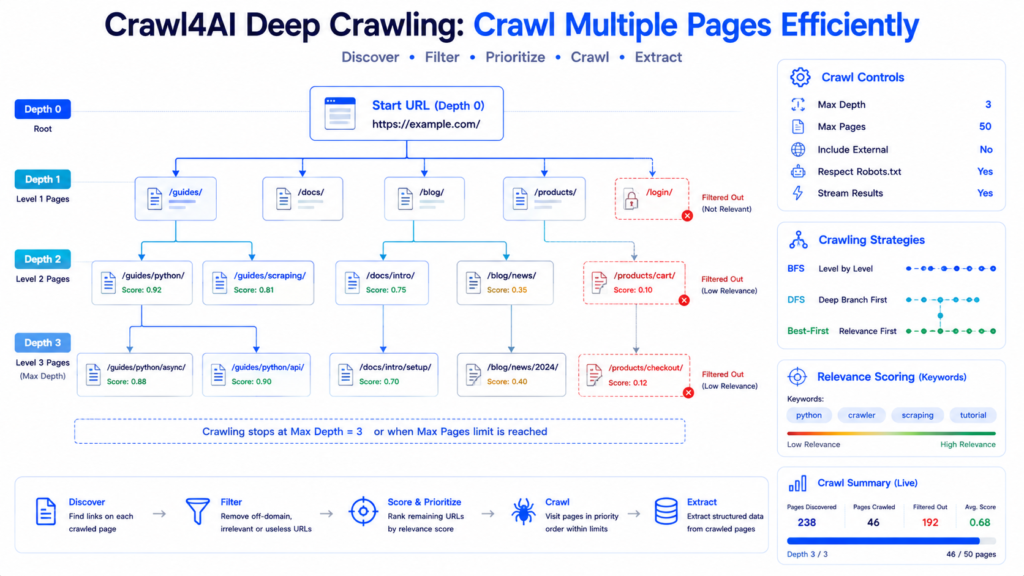
Crawl4AI deep crawling lets developers move beyond extracting a single URL and systematically explore linked pages across a website. A starting page can become the entry point for documentation, articles, category pages, or other internal resources while crawl depth, page limits, domain boundaries, filters, and URL priorities remain under explicit control.
Crawl4AI currently provides three main deep-crawl strategies: breadth-first, depth-first, and best-first crawling. Choosing between them matters because a crawler that follows every discovered link without limits can waste time on irrelevant pages. A well-designed deep crawl instead decides how far to travel, which URLs qualify, which pages deserve priority, and when crawling should stop.
What Is Deep Crawling?
A normal crawl starts with one URL:
https://example.com/and processes that page.
Deep crawling starts with the same URL but discovers links from it and continues crawling eligible linked pages.
A simple website might look like:
Homepage                     Depth 0
│
├── /guides/                 Depth 1
│   ├── /guides/python/      Depth 2
│   └── /guides/scraping/    Depth 2
│
├── /tutorials/              Depth 1
│   ├── /tutorials/api/      Depth 2
│   └── /tutorials/async/    Depth 2
│
└── /about/                  Depth 1
max_depth controls how many levels beyond the starting page Crawl4AI can explore. Crawl4AI’s documentation describes max_depth as the number of levels to crawl beyond the starting URL.
Deep crawling is useful for tasks such as documentation collection, site research, knowledge-base creation, content inventories, internal-link exploration, and multi-page data pipelines.
Build Your First Crawl4AI Deep Crawler
BFSDeepCrawlStrategy provides a straightforward starting point.
import asyncio

from crawl4ai import AsyncWebCrawler, CrawlerRunConfig
from crawl4ai.deep_crawling import BFSDeepCrawlStrategy


async def main():

    strategy = BFSDeepCrawlStrategy(
        max_depth=2,
        include_external=False,
        max_pages=20
    )

    config = CrawlerRunConfig(
        deep_crawl_strategy=strategy,
        stream=False
    )

    async with AsyncWebCrawler() as crawler:

        results = await crawler.arun(
            "https://example.com",
            config=config
        )

        for result in results:

            if result.success:
                depth = result.metadata.get("depth", 0)

                print(
                    f"Depth {depth}: {result.url}"
                )


asyncio.run(main())
Three controls are particularly important here:
max_depth=2 limits traversal depth.
include_external=False keeps the crawl within the relevant domain boundary rather than intentionally following external links.
max_pages=20 places an upper bound on the number of crawled pages.
Crawl4AI supports all three parameters directly in its deep-crawl strategies.
Understand Crawl Depth Before Increasing It
Higher depth does not automatically produce a better crawl.
Consider:
Depth 0 = 1 starting page

Depth 1 = links discovered from start page

Depth 2 = links discovered from Depth 1 pages

Depth 3 = links discovered from Depth 2 pages
A highly connected website can produce a large number of candidate URLs as depth increases.
A configuration such as:
BFSDeepCrawlStrategy(
    max_depth=5
)
therefore deserves more caution than the number 5 might suggest.
Depth should reflect the site’s structure and the actual research objective.
A small documentation area might only require:
max_depth=2A deeper hierarchical site might justify:
max_depth=3Page limits and filters should usually accompany deeper traversal.
BFS: Crawl Level by Level
Breadth-first search explores URLs at the current level before moving to the next one.
Conceptually:
              Start
            /   |   \
           A    B    C
          / \   |   / \
         D   E  F  G   H
BFS visits approximately:
Start
A, B, C
D, E, F, G, H
before progressing further.
Configure it with:
from crawl4ai.deep_crawling import BFSDeepCrawlStrategy

strategy = BFSDeepCrawlStrategy(
    max_depth=2,
    include_external=False,
    max_pages=50
)
Crawl4AI’s BFS implementation explores all links at one depth before moving deeper.
BFS works well when nearby pages are likely to be important and broad coverage matters more than following individual branches deeply.
DFS: Follow One Branch Deeper
Depth-first search follows a branch as far as allowed before returning to explore another branch.
Using the same tree:
              Start
            /   |   \
           A    B    C
          / \   |   / \
         D   E  F  G   H
DFS behaves more like:
Start
A
D
E
B
F
C
G
H
depending on discovered-link ordering.
Configuration:
from crawl4ai.deep_crawling import DFSDeepCrawlStrategy

strategy = DFSDeepCrawlStrategy(
    max_depth=3,
    include_external=False,
    max_pages=30
)
Crawl4AI describes DFS as exploring as far down one branch as possible before backtracking.
DFS can be useful when meaningful information is likely to sit several navigation levels below the entry point.
BFS vs DFS
Neither approach is universally better.
| Requirement | Better Starting Choice |
|---|---|
| Broad nearby coverage | BFS |
| Explore levels systematically | BFS |
| Follow deeper branches early | DFS |
| Deep hierarchical paths | DFS |
| Relevance-driven crawl | Best-First |

Site architecture should drive the choice.
A shallow blog archive and a deeply nested technical documentation site do not necessarily benefit from identical traversal strategies.
Best-First Crawling
Best-first crawling changes the question from:
“Which discovered URL comes next structurally?”
to:
“Which discovered URL appears most valuable?”
Crawl4AI provides BestFirstCrawlingStrategy for this purpose and identifies it as the recommended deep-crawl strategy when intelligent prioritization is desired.
A scorer can assign priorities to discovered URLs.
from crawl4ai.deep_crawling import BestFirstCrawlingStrategy
from crawl4ai.deep_crawling.scorers import KeywordRelevanceScorer

scorer = KeywordRelevanceScorer(
    keywords=[
        "python",
        "crawler",
        "scraping",
        "tutorial"
    ],
    weight=0.7
)

strategy = BestFirstCrawlingStrategy(
    max_depth=2,
    include_external=False,
    url_scorer=scorer,
    max_pages=25
)
Higher-scoring URLs receive priority.
That becomes particularly valuable when a site exposes hundreds or thousands of discoverable links but the project only needs a focused subset.
Prioritize Relevant URLs with KeywordRelevanceScorer
KeywordRelevanceScorer assigns relevance based on specified keywords.
For example:
keyword_scorer = KeywordRelevanceScorer(
    keywords=[
        "api",
        "python",
        "async",
        "configuration"
    ],
    weight=0.7
)
Attach it to a strategy:
strategy = BestFirstCrawlingStrategy(
    max_depth=3,
    url_scorer=keyword_scorer,
    max_pages=40
)
Instead of spending the limited page budget equally across every discovered path, the crawler can prioritize URLs associated with the desired subject. Crawl4AI documents URL scorers specifically as a mechanism for prioritizing discovered links.
Control Crawl Size with max_pages
Depth is only one safety boundary.
max_pages provides another:
strategy = BFSDeepCrawlStrategy(
    max_depth=3,
    max_pages=20
)
The crawl now has both a structural boundary and a page-count boundary.
This is useful for testing because a developer can first run:
max_pages=10inspect the discovered pages, refine filtering, and only then increase the budget.
Crawl4AI specifically recommends max_pages for predictable execution, limiting costs, testing configurations, and focusing on important content.
Keep Deep Crawls Inside the Intended Site
External links can quickly send a crawler away from the target website.
A documentation page might link to:
Git repositories
Social platforms
Partner sites
Reference resources
External articles
For site-focused crawling, use:
include_external=FalseDomain-level filters can provide even more explicit control.
from crawl4ai.deep_crawling.filters import (
    FilterChain,
    DomainFilter
)

filter_chain = FilterChain([
    DomainFilter(
        allowed_domains=["docs.example.com"]
    )
])
A strong production crawler should define its boundaries intentionally rather than assuming every discovered link belongs in the dataset.
Filter URLs Before Crawling Them
Deep crawling becomes more efficient when irrelevant URLs are rejected before expensive page processing.
Crawl4AI provides filtering components such as:
DomainFilter
URLPatternFilter
ContentTypeFilter
They can be combined through FilterChain.
Example:
from crawl4ai.deep_crawling.filters import (
    FilterChain,
    DomainFilter,
    URLPatternFilter,
    ContentTypeFilter
)

filters = FilterChain([
    DomainFilter(
        allowed_domains=["docs.example.com"]
    ),

    URLPatternFilter(
        patterns=[
            "*guide*",
            "*tutorial*",
            "*reference*"
        ]
    ),

    ContentTypeFilter(
        allowed_types=["text/html"]
    )
])
Then:
strategy = BestFirstCrawlingStrategy(
    max_depth=3,
    filter_chain=filters,
    max_pages=50
)
The crawler can now focus its page budget on URLs matching the desired boundaries.
Filtering and Scoring Solve Different Problems
Filters and scorers should not be confused.
A filter asks:
Should this URL be considered at all?A scorer asks:
How important is this eligible URL?Suppose 100 links are discovered.
Filtering might reduce them to 35 acceptable URLs.
Scoring can then rank those 35 so the most relevant pages are visited earlier.
That combination is especially useful when max_pages means only part of the eligible set will actually be crawled.
Crawl4AI URL filtering and relevance scoring workflow

Use score_threshold with BFS or DFS
BFS and DFS can also use a URL scorer.
Example:
strategy = DFSDeepCrawlStrategy(
    max_depth=2,
    url_scorer=KeywordRelevanceScorer(
        keywords=[
            "api",
            "guide",
            "reference"
        ]
    ),
    score_threshold=0.4
)
URLs scoring below the threshold can be skipped.
Current Crawl4AI documentation notes that score_threshold applies to BFS and DFS, while Best-First naturally processes higher-scoring pages first and does not require the threshold for prioritization.
Stream Deep Crawl Results
Large crawls do not always need to wait until every page finishes.
Streaming allows each completed result to be processed as it arrives.
config = CrawlerRunConfig(
    deep_crawl_strategy=strategy,
    stream=True
)
Then:
async with AsyncWebCrawler() as crawler:

    async for result in await crawler.arun(
        "https://example.com",
        config=config
    ):

        if result.success:

            print(
                result.url,
                result.metadata.get("depth")
            )
Streaming is particularly useful when results should be written progressively to storage or inspected during a long crawl. Crawl4AI recommends streaming with Best-First crawling.
Streamed vs Non-Streamed Deep Crawling
Non-streamed mode:
stream=FalseCollects results for processing after the crawl.
Streaming mode:
stream=TrueMakes results available progressively.
A practical distinction is:
Small crawl + post-run analysis
        ↓
Non-streamed

Large crawl + progressive processing
        ↓
Streaming
Streaming can reduce the need to hold an entire result collection before downstream processing begins.
Read Crawl Depth and Score from Results
Deep-crawl metadata helps explain why and where pages were discovered.
For example:
depth = result.metadata.get(
    "depth",
    0
)

score = result.metadata.get(
    "score",
    0
)

print(
    f"Depth: {depth} | "
    f"Score: {score} | "
    f"URL: {result.url}"
)
Depth can reveal whether most useful pages appear close to the root or several levels down.
Score becomes especially useful with prioritized crawling.
Those signals can help tune later runs rather than repeatedly crawling with arbitrary settings.
Deep Crawling vs arun_many()
These features solve related but different problems.
Deep crawling begins with a starting page and discovers additional URLs through links.
arun_many() begins with a list of URLs you already know and crawls those URLs concurrently or in controlled batches.
For example:
urls = [
    "https://example.com/page-1",
    "https://example.com/page-2",
    "https://example.com/page-3"
]
Then:
results = await crawler.arun_many(
    urls=urls,
    config=config
)
Crawl4AI documents arun_many() specifically for concurrent/batch multi-URL crawling and supports dispatchers for memory management, rate limiting, and concurrency control.
Use deep crawling when URL discovery is part of the task.
Use arun_many() when the target URL list already exists.

Manage Known URL Lists Efficiently
For a large known URL collection, avoid manually calling arun() sequentially for every page when controlled concurrency is appropriate.
Crawl4AI’s multi-URL documentation recommends arun_many() and supports MemoryAdaptiveDispatcher for resource-aware concurrency.
Example:
from crawl4ai.async_dispatcher import (
    MemoryAdaptiveDispatcher
)

dispatcher = MemoryAdaptiveDispatcher(
    memory_threshold_percent=70.0,
    max_session_permit=10
)
Then:
results = await crawler.arun_many(
    urls=urls,
    config=config,
    dispatcher=dispatcher
)
The dispatcher can adapt concurrency according to system memory rather than launching an uncontrolled number of browser tasks.
Respect Rate Limits During Larger Crawls
Efficiency does not mean sending as many requests as possible.
A larger crawl should account for server capacity, rate limits, and crawl policies.
Crawl4AI provides RateLimiter for request pacing and retry behavior.
from crawl4ai.async_dispatcher import (
    MemoryAdaptiveDispatcher,
    RateLimiter
)

dispatcher = MemoryAdaptiveDispatcher(
    max_session_permit=5,
    rate_limiter=RateLimiter(
        base_delay=(1.0, 2.0),
        max_delay=30.0,
        max_retries=2
    )
)
Crawl4AI’s dispatcher documentation describes rate limiting with backoff for responses such as HTTP 429 and 503.
Production crawlers should also respect applicable site terms, robots directives, access restrictions, and reasonable request rates.
Build a Focused Deep Crawler
A practical configuration combines filters, scoring, limits, and streaming.
import asyncio

from crawl4ai import (
    AsyncWebCrawler,
    CrawlerRunConfig
)

from crawl4ai.deep_crawling import (
    BestFirstCrawlingStrategy
)

from crawl4ai.deep_crawling.filters import (
    FilterChain,
    DomainFilter,
    URLPatternFilter,
    ContentTypeFilter
)

from crawl4ai.deep_crawling.scorers import (
    KeywordRelevanceScorer
)


async def main():

    filters = FilterChain([
        DomainFilter(
            allowed_domains=[
                "docs.example.com"
            ]
        ),

        URLPatternFilter(
            patterns=[
                "*guide*",
                "*tutorial*",
                "*reference*"
            ]
        ),

        ContentTypeFilter(
            allowed_types=[
                "text/html"
            ]
        )
    ])

    scorer = KeywordRelevanceScorer(
        keywords=[
            "python",
            "api",
            "crawler",
            "configuration"
        ],
        weight=0.7
    )

    strategy = BestFirstCrawlingStrategy(
        max_depth=3,
        include_external=False,
        max_pages=50,
        filter_chain=filters,
        url_scorer=scorer
    )

    config = CrawlerRunConfig(
        deep_crawl_strategy=strategy,
        stream=True
    )

    async with AsyncWebCrawler() as crawler:

        async for result in await crawler.arun(
            "https://docs.example.com",
            config=config
        ):

            if not result.success:
                continue

            print(
                result.metadata.get("depth", 0),
                result.metadata.get("score", 0),
                result.url
            )


asyncio.run(main())
This architecture follows a useful order:
Start URL
   ↓
Discover Links
   ↓
Check Domain
   ↓
Apply URL Filters
   ↓
Score Eligible URLs
   ↓
Prioritize Pages
   ↓
Respect Depth/Page Limits
   ↓
Crawl
   ↓
Stream Results
That is much more controlled than simply following every link.
Avoid Duplicate and Low-Value Crawling
Large sites often expose multiple URLs leading to similar or low-value content.
Common examples include:
Tracking parameters
Archive pages
Tag pages
Login routes
Search pages
Print versions
Repeated navigation destinations
URL patterns should be designed around the actual dataset required.
A documentation crawler, for example, might focus on:
/docs/
/guide/
/api/
/reference/
while rejecting unrelated account or marketing areas.
Filtering early saves browser work later.
Monitor Deep Crawl Quality
Page count alone is a weak success metric.
A crawl that collects 2,000 irrelevant pages is worse than one that captures 150 highly relevant pages.
Track signals such as:
Successful pages
Failed pages
Pages per depth
Average relevance score
Filtered URLs
Useful-content ratio
Duplicate rate
Processing time
Depth distribution can be calculated from result metadata:
depth_counts = {}

for result in results:

    depth = result.metadata.get(
        "depth",
        0
    )

    depth_counts[depth] = (
        depth_counts.get(depth, 0) + 1
    )

print(depth_counts)
Results from small test crawls can reveal whether max_depth filters, scoring, and page limits need adjustment.

Production Deep-Crawl Checklist
A dependable crawl should answer these questions before running at scale:
- What exact domain or subdomain is allowed?
- How deep does useful content actually live?
- What is the maximum page budget?
- Which URL patterns should be rejected?
- Which content types are useful?
- Does relevance scoring improve prioritization?
- Should results stream to storage?
- What request rate is appropriate?
- How will failures be logged?
- How will interrupted long-running crawls recover?
Current Crawl4AI deep-crawl strategies also support cancellation and crash-recovery capabilities for long-running production crawls.
Common Crawl4AI Deep Crawling Problems
Too Many Pages Are Crawled
Reduce:
max_depthand set:
max_pagesThen add stricter URL and domain filters.
Irrelevant Pages Consume the Crawl Budget
Use FilterChain to reject irrelevant URLs and Best-First plus a scorer to prioritize relevant ones.
Useful Deep Pages Are Not Reached
Check whether max_depth is too low or URL filters are accidentally rejecting required paths.
External Websites Are Being Followed
Use:
include_external=Falseand consider an explicit DomainFilter.
Large Crawls Consume Too Many Resources
For known multi-URL workloads, use arun_many() with an appropriate dispatcher and rate limiter. For deep crawls, tighten page limits, filters, and result processing.
Results Take Too Long to Become Available
Use:
stream=Truewhen progressive result handling suits the workflow.
Crawl4AI Deep Crawling FAQ
Can Crawl4AI automatically follow links?
Yes. Deep-crawl strategies discover eligible links from crawled pages and continue according to depth, domain, filtering, scoring, and page-limit rules.
What is the best Crawl4AI deep-crawl strategy?
The best strategy depends on the goal. BFS provides broad level-by-level exploration, DFS follows branches deeply, and Best-First prioritizes URLs using scores. Crawl4AI’s current documentation highlights Best-First as the recommended strategy for intelligent prioritized exploration.
What does max_depth mean?
max_depth specifies how many levels beyond the starting page the crawler may explore.
How can I prevent an unlimited crawl?
Combine max_depth, max_pages, domain boundaries, and URL filters.
Can Crawl4AI prioritize specific pages?
Yes. URL scorers such as KeywordRelevanceScorer can prioritize discovered URLs, particularly with BestFirstCrawlingStrategy.
Does deep crawling support streaming?
Yes. stream=True allows deep-crawl results to be processed progressively.
Is deep crawling the same as arun_many()?
No. Deep crawling discovers linked URLs starting from a seed page. arun_many() processes a supplied list of URLs concurrently or in batches.
How should large known URL lists be crawled?
arun_many() supports concurrent multi-URL crawling, while dispatchers provide memory-aware or fixed concurrency and optional rate limiting.
Conclusion
Crawl4AI deep crawling makes multi-page website exploration controllable rather than indiscriminate. BFS can provide broad level-by-level coverage, DFS can explore individual branches deeply, and Best-First can prioritize discovered URLs according to relevance. max_depth, max_pagesDomain restrictions, filters, scorers, and streaming then provide the controls required to keep the crawl focused.
Crawl4AI delivers the most efficient deep-crawl workflow when discovery and resource limits are designed together. A small test crawl, strict domain boundaries, early URL filtering, relevance-based prioritization, sensible page limits, progressive result processing, and responsible request pacing can turn a large linked website into a focused collection of useful pages without wasting crawl capacity on every URL the crawler encounters.