
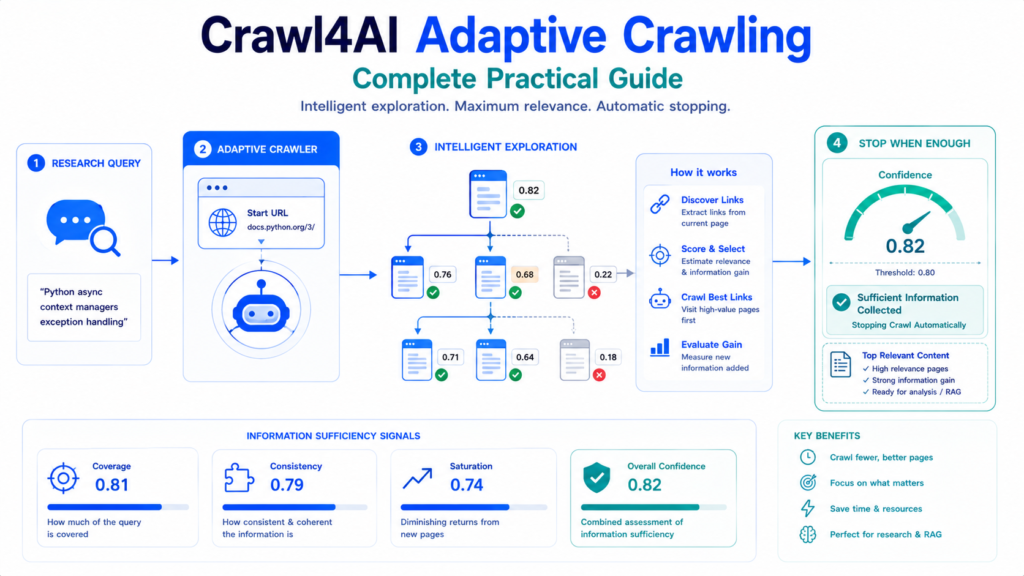
Crawl4AI Adaptive Crawling changes multi-page crawling from a fixed traversal problem into an information-sufficiency problem. Instead of deciding in advance that a crawler must visit a certain depth or every page in a section, AdaptiveCrawler evaluates the information gathered for a specific query and can stop automatically when it has collected enough useful context.
Crawl4AI currently evaluates adaptive crawl quality through coverage, consistency, and saturation. These signals help reduce both under-crawling, where important information is missed, and over-crawling, where unnecessary pages consume time and resources. Adaptive crawling is therefore particularly useful for focused research, question answering, and knowledge-base collection rather than complete site archiving.
What Is Crawl4AI Adaptive Crawling?
Traditional crawling usually begins with predefined limits:
Start URL
    ↓
Follow Links
    ↓
Depth 1
    ↓
Depth 2
    ↓
Depth 3
    ↓
Stop at configured limit
That approach answers:
“How far should the crawler travel?”
Adaptive crawling instead asks:
“Have we gathered enough information for this query?”
A simplified adaptive workflow looks like:
Research Query
      ↓
Start URL
      ↓
Crawl Relevant Page
      ↓
Measure Information Gain
      ↓
Evaluate Confidence
      ↓
Enough information?
   ↙             ↘
 No              Yes
 ↓                ↓
Select Next      Stop
Useful Link
The crawler can therefore stop before exhausting every discoverable page when additional pages are unlikely to improve the answer significantly.
Your First AdaptiveCrawler
Crawl4AI exposes adaptive crawling through AdaptiveCrawler.
A basic implementation is:
import asyncio

from crawl4ai import (
    AsyncWebCrawler,
    AdaptiveCrawler
)


async def main():

    async with AsyncWebCrawler() as crawler:

        adaptive = AdaptiveCrawler(crawler)

        state = await adaptive.digest(
            start_url="https://docs.python.org/3/",
            query="async context managers"
        )

        print(
            f"Pages crawled: "
            f"{len(state.crawled_urls)}"
        )

        print(
            f"Confidence: "
            f"{adaptive.confidence:.0%}"
        )

        adaptive.print_stats()


asyncio.run(main())
digest() requires two critical pieces of information:
start_url="https://docs.python.org/3/"provides the crawl starting point, while:
query="async context managers"defines the information the crawler is trying to collect.
The returned object is a CrawlState, while adaptive.confidence exposes the crawler’s current confidence about information sufficiency.
Adaptive Crawling vs Deep Crawling
Deep crawling and adaptive crawling should not be treated as interchangeable.
A conventional deep crawler typically follows a traversal strategy such as BFS, DFS, or Best-First within predefined limits.
Adaptive crawling introduces another decision layer:
| Deep Crawling | Adaptive Crawling |
|---|---|
| Traversal-oriented | Information-oriented |
| Often controlled by depth/pages | Controlled by information sufficiency |
| Explores according to crawl strategy | Selects links according to expected value |
| Stops at configured boundaries | Can stop when confidence is sufficient |
| Good for systematic site exploration | Good for query-focused research |
Crawl4AI’s documentation explicitly distinguishes adaptive crawling from fixed BFS/DFS-style traversal because adaptive crawling continuously evaluates what has already been learned.
That makes Article #8 different from the previous deep-crawling guide: Deep Crawling focuses on navigating a website efficiently; Adaptive Crawling focuses on knowing when enough relevant information has been collected.
Three Signals Behind Adaptive Crawling
Adaptive crawling uses three major signals:
Coverage
+
Consistency
+
Saturation
      ↓
Information Sufficiency
      ↓
Confidence
Each answers a different question.
Coverage
Coverage evaluates how well the collected knowledge addresses the query.
Suppose the query is:
Python async context managers exception handlingPages discussing only async may provide partial coverage.
Pages covering:
async
context managers
__aenter__
__aexit__
exception handling
provide broader query coverage.
Coverage therefore helps determine whether important parts of the information need remain unresolved.
Consistency
Consistency evaluates whether information collected across pages forms a coherent body of knowledge.
Several relevant pages that support and complement one another provide a stronger knowledge base than disconnected pages that merely happen to contain matching terms.
Consistency becomes valuable because raw keyword occurrence alone does not guarantee that the collected material is useful as a whole.
Saturation
Saturation asks whether newly crawled pages continue adding useful information.
Imagine information gain behaving like:
Page 1 → Large gain
Page 2 → Large gain
Page 3 → Moderate gain
Page 4 → Small gain
Page 5 → Very small gain
Page 6 → Almost nothing new
At some point, continuing the crawl produces diminishing returns.
Saturation helps recognize that point so the crawler does not continue indefinitely simply because more links remain available.
Understand the Confidence Score
AdaptiveCrawler exposes an overall confidence value between 0 and 1.
Conceptually:
0.0 ─────────────────────────────── 1.0

Low information                 Strong information
Current Crawl4AI guidance interprets confidence approximately as:
| Confidence | Interpretation |
|---|---|
| 0.0–0.3 | Insufficient information |
| 0.3–0.6 | Partial information |
| 0.6–0.7 | Good coverage |
| 0.7–1.0 | Strong/comprehensive coverage |

A confidence threshold tells the crawler when information quality is sufficient for the intended task.
Confidence should not be interpreted as a guarantee that every statement on every page is factually correct. It measures the adaptive crawler’s estimate of information sufficiency for the query.
Configure AdaptiveConfig
AdaptiveConfig Provides the main adaptive-crawl controls.
from crawl4ai import AdaptiveConfig

config = AdaptiveConfig(
    confidence_threshold=0.8,
    max_pages=30,
    top_k_links=5,
    min_gain_threshold=0.05
)
Then pass it into the crawler:
adaptive = AdaptiveCrawler(
    crawler,
    config=config
)
Four settings deserve particular attention:
confidence_threshold
max_pages
top_k_links
min_gain_threshold
Together they control completeness, safety, link exploration, and diminishing-return behavior.
Set confidence_threshold Carefully
confidence_threshold controls the confidence level required before the adaptive crawler considers the collected information sufficient.
For exploratory work:
config = AdaptiveConfig(
    confidence_threshold=0.6
)
may allow an earlier stop.
For research requiring broader coverage:
config = AdaptiveConfig(
    confidence_threshold=0.85
)
demands stronger evidence before stopping.
Current documentation recommends starting around the defaults for general tasks, lowering the threshold for exploratory crawling, and increasing it when more exhaustive coverage is important.
Higher is not automatically better.
An unnecessarily aggressive threshold can force the crawler to spend substantially more effort chasing small improvements.
Keep max_pages as a Safety Boundary
Adaptive stopping should still have a hard page limit.
Example:
config = AdaptiveConfig(
    confidence_threshold=0.8,
    max_pages=25
)
Two stopping mechanisms now exist:
Confidence reaches target
          OR
Maximum page count reached
This distinction matters.
confidence_threshold represents the desired information quality, while max_pages represents the resource ceiling.
A difficult or poorly matched query may never achieve the requested confidence, so max_pages prevents an excessive crawl.
Control Link Exploration with top_k_links
Every crawled page may expose many links.
Following all of them defeats much of the purpose of adaptive crawling.
top_k_links limits how many promising links are selected from each page:
config = AdaptiveConfig(
    top_k_links=3
)
Conceptually:
Current Page
   ↓
20 Discovered Links
   ↓
Estimate Relevance / Gain
   ↓
Rank Candidates
   ↓
Keep Top 3
   ↓
Continue Research
A higher value casts a wider net.
A lower value creates a more selective crawl.
Crawl4AI’s adaptive link selection considers relevance to the query, expected information gain, and characteristics such as URL structure and depth.
Stop Low-Gain Exploration with min_gain_threshold
Adaptive crawling is valuable because a crawler can recognize diminishing returns.
min_gain_threshold controls the minimum expected improvement required to continue:
config = AdaptiveConfig(
    min_gain_threshold=0.05
)
Imagine candidate links with expected gains:
/api/authentication     0.31
/api/oauth              0.22
/security/tokens        0.14
/company/about          0.02
/contact                0.01
With a meaningful gain threshold, the crawler can focus on the first group instead of consuming its page budget on links unlikely to improve the knowledge base.
This is one of the clearest differences between adaptive research and blind traversal.
Statistical Strategy: Fast Adaptive Crawling
Crawl4AI supports two major adaptive strategies.
The default is:
config = AdaptiveConfig(
    strategy="statistical",
    confidence_threshold=0.8
)
The statistical strategy uses term-oriented and information-theoretic analysis rather than requiring an external model for semantic understanding.
Advantages include:
- Fast execution
- No external model API requirement
- Literal query-term analysis
- Low operational cost
- Strong fit for technical terminology
Crawl4AI recommends this approach for well-defined queries where the expected terminology is reasonably specific.
A query such as:
OAuth2 JWT authentication rate limitsis a strong statistical-strategy candidate because it contains precise terminology likely to appear directly in relevant documentation.
Embedding Strategy: Semantic Adaptive Crawling
Exact terms are not always enough.
A user researching:
ways to prevent an API from being overwhelmedmight need pages containing terms such as:
rate limiting
throttling
request quotas
backoff
traffic control
even when the original wording does not appear.
Crawl4AI’s embedding strategy is designed for semantic matching:
config = AdaptiveConfig(
    strategy="embedding",
    embedding_model=(
        "sentence-transformers/"
        "all-MiniLM-L6-v2"
    ),
    n_query_variations=10,
    embedding_min_confidence_threshold=0.1
)
The strategy supports semantic query understanding, query expansion, gap-driven page selection, and validation-oriented stopping.
Statistical vs Embedding Strategy
The choice can be simplified:
| Requirement | Statistical | Embedding |
|---|---|---|
| Exact terminology | Excellent | Excellent |
| Semantic concepts | Limited | Strong |
| Fast execution | Strong | Moderate |
| External API required | No | Depends on configuration |
| Literal matching | Strong | Strong |
| Conceptual research | Moderate | Strong |
| Technical docs | Excellent | Strong |
| Ambiguous questions | Limited | Better |

Crawl4AI describes statistical crawling as the fast, dependency-light option and embedding crawling as the deeper semantic option.
Use semantic complexity—not novelty—as the reason to choose embeddings.
Configure API-Based Embeddings Correctly
Embedding mode can also use provider-based models.
Crawl4AI separates the model responsible for embeddings from the model responsible for query expansion:
from crawl4ai import (
    AdaptiveConfig,
    LLMConfig
)

config = AdaptiveConfig(
    strategy="embedding",

    embedding_llm_config=LLMConfig(
        provider="YOUR_EMBEDDING_PROVIDER",
        api_token="YOUR_API_KEY"
    ),

    query_llm_config=LLMConfig(
        provider="YOUR_CHAT_PROVIDER",
        api_token="YOUR_API_KEY"
    )
)
The distinction is important:
Embedding model
    ↓
Text → vectors

Query model
    ↓
Original query → useful variations
Current Crawl4AI documentation recommends separate configurations because these are fundamentally different model tasks.
Handle Irrelevant Queries
Adaptive crawling should also recognize when a website is simply the wrong information source.
For example:
state = await adaptive.digest(
    start_url="https://docs.python.org/3/",
    query="traditional Italian pasta recipes"
)
With the embedding strategy, Crawl4AI can identify very low relevance and expose an irrelevance signal:
if state.metrics.get(
    "is_irrelevant",
    False
):
    print(
        "Query is unrelated "
        "to this website."
    )
This prevents a dangerous assumption:
More crawling cannot fix a fundamentally irrelevant source.
Crawl4AI documents explicit irrelevant-query detection for its embedding adaptive strategy.
Retrieve the Most Relevant Pages
Adaptive crawling is not only about deciding when to stop.
The collected knowledge can also be ranked.
relevant_pages = (
    adaptive.get_relevant_content(
        top_k=5
    )
)

for page in relevant_pages:

    print(
        page["url"],
        page["score"]
    )
This lets downstream applications focus on the strongest collected pages rather than treating every crawled page equally.
A research pipeline might therefore become:
Question
   ↓
Adaptive Crawl
   ↓
Confidence-Based Stop
   ↓
Top Relevant Pages
   ↓
Clean Content
   ↓
RAG / Knowledge Base / Analysis
get_relevant_content(top_k=...) is part of the current AdaptiveCrawler API.
Inspect Crawl Statistics
Adaptive decisions should be observable.
Crawl4AI provides:
adaptive.print_stats()for summary information.
Detailed statistics can be requested with:
adaptive.print_stats(
    detailed=True
)
Statistics include information such as pages crawled, achieved confidence, coverage, consistency, saturation, and efficiency-related metrics.
This data is useful when tuning a configuration.
For example:
Low coverage
→ query terms may be poorly represented

Low consistency
→ collected pages may be fragmented

High saturation
→ additional pages may add little value
Configuration changes should be driven by those signals rather than increasing max_pages blindly.
Save Adaptive Crawl Progress
Long research crawls may need persistence.
Enable state saving:
config = AdaptiveConfig(
    confidence_threshold=0.8,
    max_pages=40,
    save_state=True,
    state_path="adaptive_state.json"
)
The adaptive crawler can then preserve progress while crawling.
Persistence becomes valuable when:
Network interruption occurs
Process stops
Research is intentionally paused
Large crawl spans multiple sessions
A crawler that understands what it already learned should not need to rebuild the same knowledge unnecessarily.
Resume an Interrupted Adaptive Crawl
A saved state can be resumed:
state = await adaptive.digest(
    start_url="https://example.com/docs",
    query="API authentication security",
    resume_from="adaptive_state.json"
)
The crawler can continue from previously persisted progress instead of treating the task as a completely new research session.
This is especially useful when a high confidence threshold requires a larger crawl.
Export the Knowledge Base
Collected adaptive-crawl knowledge can be exported to JSONL:
adaptive.export_knowledge_base(
    "knowledge_base.jsonl"
)
A different adaptive crawler can import it:
new_adaptive = AdaptiveCrawler(crawler)

await new_adaptive.import_knowledge_base(
    "knowledge_base.jsonl"
)
Crawl4AI exposes both knowledge-base export and import methods in its current adaptive API.
This makes adaptive crawling useful beyond a single script run.
Collected information can become a reusable research asset.
Use Adaptive Crawling for RAG Research
Adaptive crawling is naturally suited to query-focused RAG preparation.
A fixed crawler might collect:
500 pages
↓
Clean everything
↓
Chunk everything
↓
Embed everything
An adaptive workflow can instead aim for:
Research Question
        ↓
AdaptiveCrawler
        ↓
Relevant Link Selection
        ↓
Information Gain Evaluation
        ↓
Confidence Reached
        ↓
Top Relevant Content
        ↓
Chunk / Embed
        ↓
Knowledge Base
The advantage is not merely fewer pages.
The real goal is a more focused evidence set.
Crawl4AI specifically identifies question answering and knowledge-base building among adaptive crawling’s strongest use cases.
When Adaptive Crawling Is the Right Choice
Adaptive crawling is particularly suitable for:
Research tasks: collecting enough information about a defined subject.
Question answering: gathering sufficient context for a specific question.
Knowledge-base creation: building focused datasets instead of mirroring an entire website.
Product or feature research: finding information distributed across multiple relevant pages.
AI context gathering: collecting targeted material before downstream LLM processing.
These use cases align with Crawl4AI’s documented recommendations.
When Adaptive Crawling Is Not the Right Choice
Adaptive crawling should not replace every other crawl mode.
Full Site Archiving
If every accessible page must be collected regardless of relevance, information sufficiency is the wrong stopping condition.
Predictable Structured Extraction
If a known product listing contains exactly the records required, CSS/XPath structured extraction is more direct.
Known URL Lists
If all target URLs are already available, arun_many() may be a more appropriate execution model.
Continuous Monitoring
A monitoring workflow needs scheduled revisits and change detection rather than stopping permanently when initial information becomes sufficient.
Crawl4AI’s documentation similarly advises against adaptive crawling for complete site archiving, predictable structured-data collection, and real-time monitoring.
Tune an Adaptive Crawl in Practice
A practical starting configuration for focused documentation research could be:
config = AdaptiveConfig(
    strategy="statistical",
    confidence_threshold=0.8,
    max_pages=25,
    top_k_links=4,
    min_gain_threshold=0.05,
    save_state=True,
    state_path="research_state.json"
)
Then:
async with AsyncWebCrawler() as crawler:

    adaptive = AdaptiveCrawler(
        crawler,
        config=config
    )

    state = await adaptive.digest(
        start_url=(
            "https://example.com/docs/"
        ),
        query=(
            "authentication OAuth2 "
            "JWT rate limits"
        )
    )

    adaptive.print_stats(
        detailed=True
    )

    pages = adaptive.get_relevant_content(
        top_k=5
    )
This creates several independent safeguards:
Specific query
     ↓
Relevant-link selection
     ↓
Information-gain requirement
     ↓
Confidence target
     ↓
Maximum-page boundary
     ↓
Saved progress
No single parameter is expected to control the entire crawl.
Improve Query Formulation
Adaptive crawling depends heavily on the research query.
Weak:
PythonBetter:
Python asynchronous context managersStronger for a defined research goal:
Python asynchronous context managers
__aenter__ __aexit__ exception handling
Specific queries give the crawler stronger signals for relevance, coverage, and link selection.
Crawl4AI’s own best-practice guidance recommends descriptive queries containing important expected terms and warns against unnecessarily broad queries.
Practical Adaptive Crawling Workflow
A production-oriented process can follow:
Define Research Question
        ↓
Choose Statistical or Embedding
        ↓
Set Confidence Threshold
        ↓
Set max_pages Safety Limit
        ↓
Choose top_k_links
        ↓
Start AdaptiveCrawler
        ↓
Crawl Best Candidate
        ↓
Measure Coverage
        ↓
Measure Consistency
        ↓
Measure Saturation
        ↓
Estimate Confidence
        ↓
Enough Information?
   ↙                 ↘
 No                  Yes
 ↓                     ↓
Continue            Stop
   ↓                     ↓
Expected Gain       Rank Relevant Pages
                         ↓
                   Export Knowledge
This workflow separates research quality controls from resource controls.
That separation is the core practical advantage of adaptive crawling.
Common Adaptive Crawling Problems
Crawl Stops Earlier Than Expected
Check:
confidence_thresholdand:
min_gain_thresholdA low confidence target or aggressive minimum-gain requirement can cause earlier stopping.
Too Many Pages Are Crawled
Reduce:
max_pagesor:
top_k_linksand inspect whether the query is too broad.
Confidence Remains Low
A low score can mean the site does not contain enough relevant information, the query terminology does not match the source well, or a semantic embedding strategy would be more appropriate.
Statistical Strategy Misses Conceptually Related Pages
Switching to:
strategy="embedding"may improve semantic discovery when relevant pages use different terminology.
Embedding Crawl Is More Expensive
Use statistical mode when exact terminology is sufficient, or use local embeddings where appropriate. API-backed embedding and query-expansion configurations can introduce provider costs.
Crawl Cannot Find an Answer
Do not automatically raise max_pages.
First determine whether the source website actually contains information relevant to the query.
Crawl4AI Adaptive Crawling FAQ
Does Crawl4AI AdaptiveCrawler automatically stop?
Yes. It can stop when its configured information-sufficiency criteria indicate enough useful information has been collected, while max_pages provides a hard safety boundary.
What does AdaptiveCrawler measure?
The adaptive system evaluates coverage, consistency, and saturation to estimate information sufficiency.
Does adaptive crawling require an LLM?
Not necessarily. The default statistical strategy works without external model calls. Embedding mode can use local embeddings or configured model services depending on the setup.
What is confidence_threshold?
It defines the confidence level at which the crawler can consider its collected information sufficient.
What does top_k_links do?
It controls how many of the strongest candidate links are followed from each stage/page of adaptive exploration.
Can an adaptive crawl be resumed?
Yes. Crawl state can be saved and later supplied through resume_from.
Can I export the collected knowledge?
Yes. export_knowledge_base() writes the collected knowledge to JSONL, and import_knowledge_base() can load it into another adaptive crawler.
Is AdaptiveCrawler suitable for RAG?
Yes. Focused research and knowledge-base building are documented use cases, making adaptive crawling useful for collecting relevant context before chunking, embedding, retrieval, or other RAG stages.
Conclusion
Crawl4AI Adaptive Crawling provides a smarter stopping model for query-focused web research. Coverage evaluates whether the required topics are represented, consistency evaluates whether the collected knowledge fits together, and saturation detects diminishing information gain. confidence_threshold, max_pages, top_k_links, and min_gain_threshold then provide practical controls over completeness and resource consumption.
Crawl4AI becomes especially powerful when adaptive crawling is used for the jobs it was designed to solve: focused research, question answering, AI context collection, and knowledge-base construction. Statistical mode provides a fast approach for precise terminology, embedding mode adds semantic understanding for more complex questions, and persistence plus knowledge export make the resulting research reusable instead of disposable.